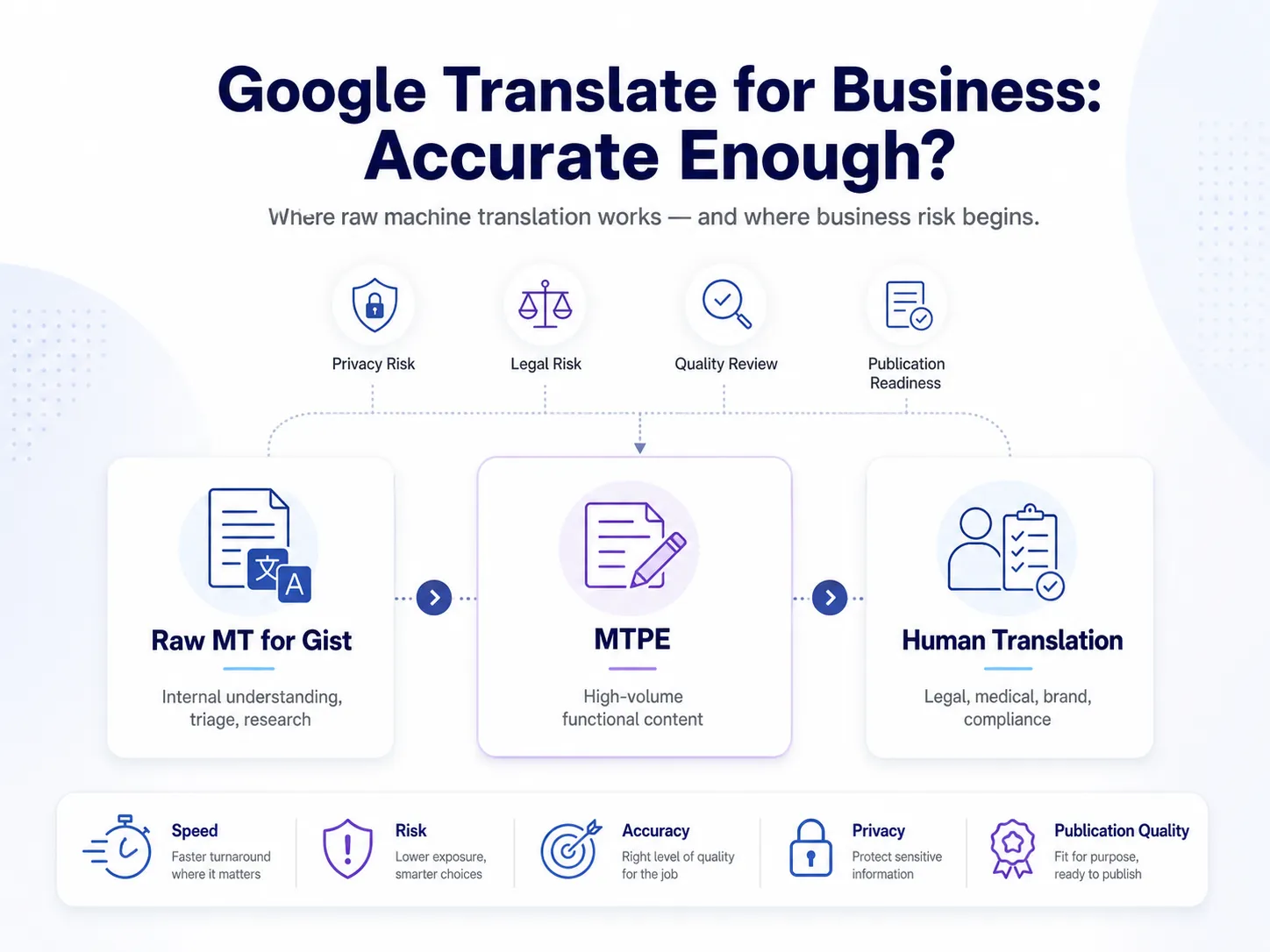
Google Translate is around 85–94% accurate for common European language pairs on general text. Though it is enough for gist understanding, but not for publication. Accuracy drops sharply across technical, legal, and medical content, as well as complex APAC languages (Japanese, Chinese, Korean, Thai). For business use, accuracy depends on the language pair, the content type, and the cost of getting it wrong.
Let’s be honest here. Google Translate in 2025 is a very different product from Google Translate in 2016, when it switched from old phrase-based translation to neural machine translation (NMT). The new version is far more fluent, more context-aware, and genuinely useful for many tasks. It is also free, fast, and supports more than 130 languages.
So the honest question isn’t “is Google Translate any good?” It is. The real question is: “Is it good enough for this content, in this language pair, for this business purpose?” That’s what this article answers.
This guide covers how Google Translate works and why accuracy improved, what BLEU scores actually mean, the data privacy risk most companies miss, where Google Translate is fine and where it creates real risk, how it compares to DeepL and ChatGPT, and a practical decision framework for B2B teams.
How Google Translate’s Accuracy Has Improved Dramatically Since 2016
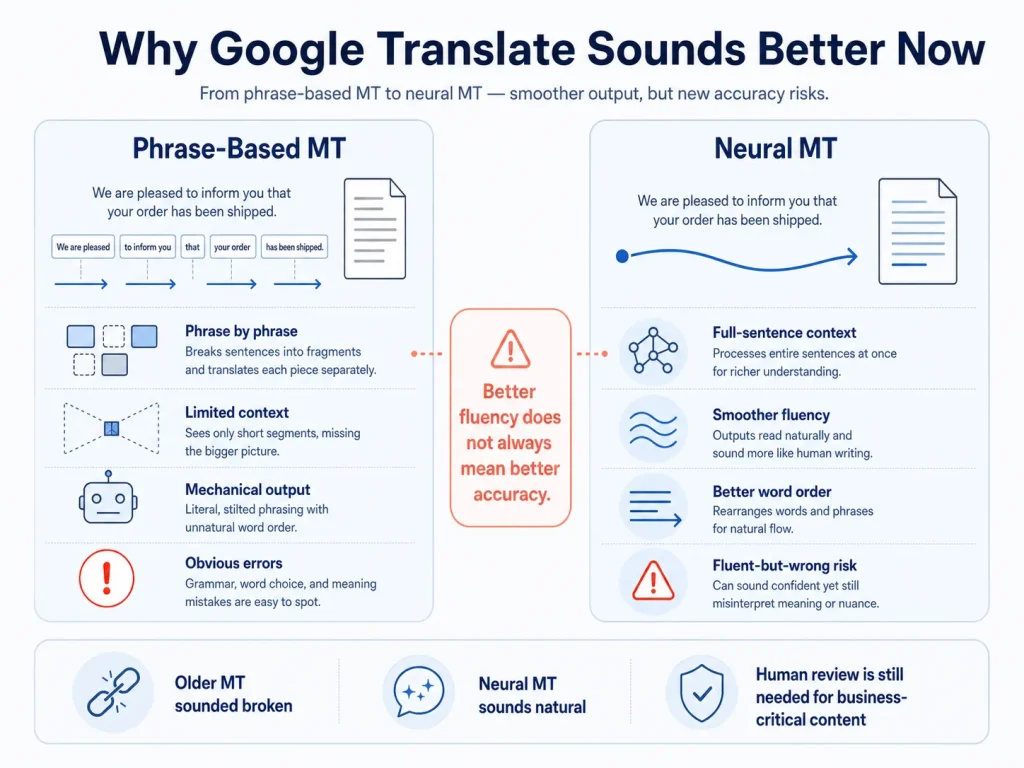
Google Translate switched from phrase-based translation to neural machine translation (NMT) in 2016, and that switch is the reason it sounds so much better today.
Understanding the difference helps you understand when to trust it. The architecture decides where it works and where it still breaks.
Phrase-Based vs Neural Machine Translation
| Feature | Phrase-Based MT (pre-2016) | Neural Machine Translation (2016+) | What It Means in Practice |
|---|---|---|---|
| Translation unit | Phrase by phrase; no full sentence context | Full sentence encoded before output | NMT sounds more natural; fewer ‘word salad’ errors |
| Context awareness | Very limited | Full sentence context; some paragraph context | NMT handles pronouns and word order better |
| Fluency | Mechanical; robotic | Much more natural | NMT output is hard to spot as machine-translated for general content |
| Rare words | Fails on words outside its phrase table | Learns word patterns; handles inflection | NMT works better on Polish, Finnish, Turkish |
| Training data | Phrase-aligned bilingual data | Massive sentence-aligned datasets | High-resource pairs (EN-FR, EN-ES) outperform low-resource pairs |
| Error type | Obvious, predictable mistakes | Fluent-sounding but wrong (‘hallucinations’) | NMT errors are MORE dangerous because they sound plausible |
That last row is the key insight. NMT errors are harder to catch than the old phrase-based ones, because the wrong output sounds right.
Why Google Translate Sounds Right, But Can Still Be Wrong
Google Translate’s neural network turns each source sentence into a mathematical pattern, then create the translation word by word. It picks each word based on the highest statistical probability.
That’s why it sounds fluent. The system is good at picking word sequences that statistically look right in the target language. But as we know, statistically right and actually correct are not the same thing.
The ‘fluent but wrong’ problem
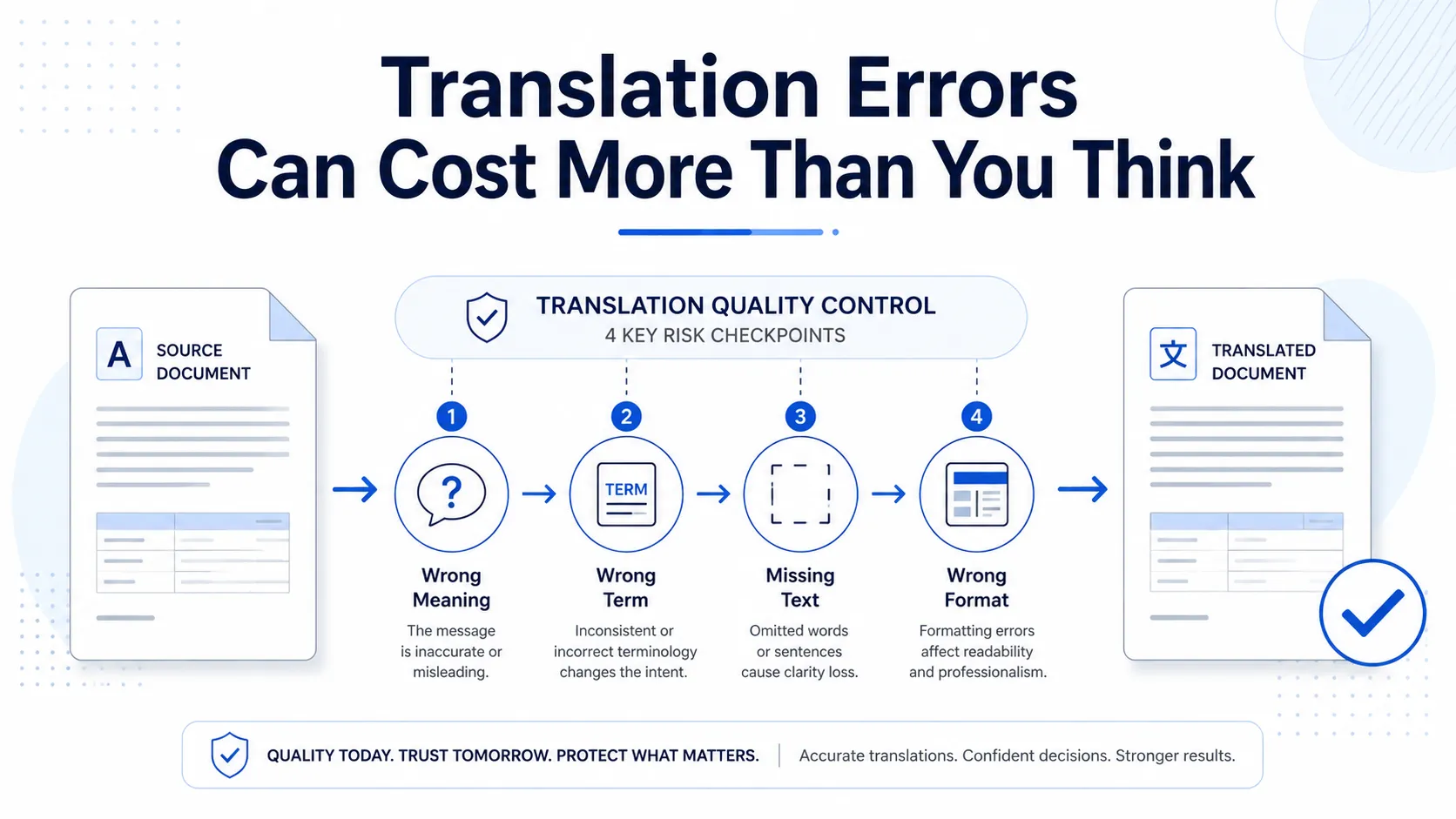
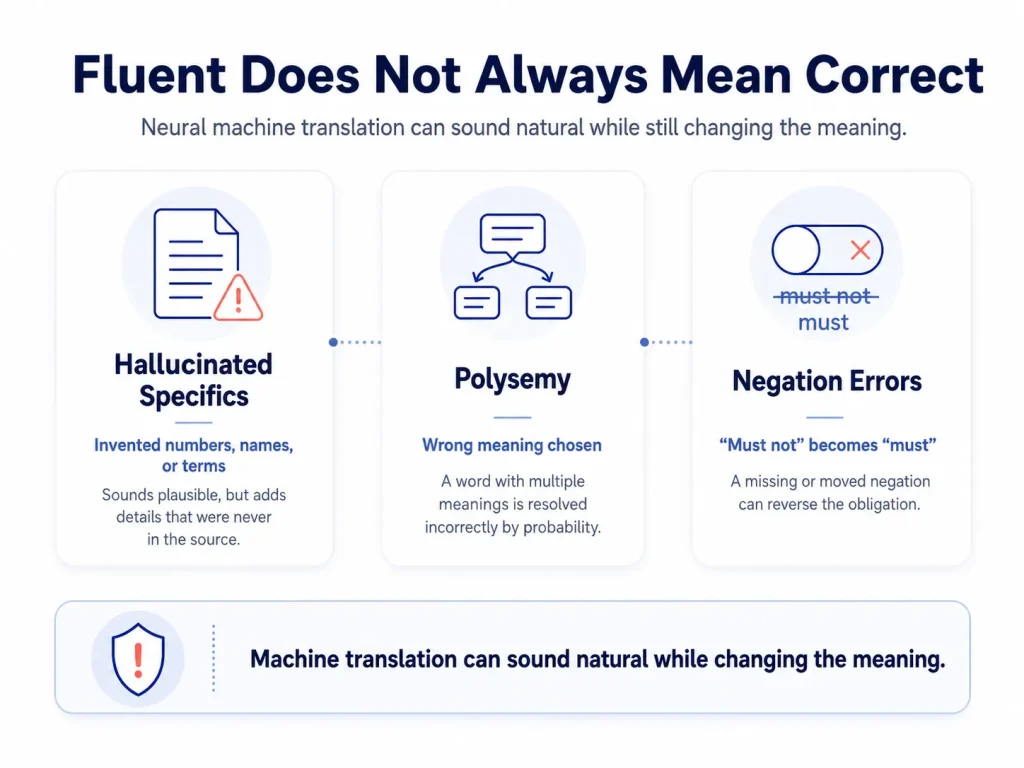
NMT can produce output that’s grammatically correct, sounds natural to a native reader, and means the wrong thing. Three common failure modes:
- Hallucinated specifics — the model invents a number, name, or term when it can’t find a high-probability match. In a blog post, that’s a typo. In a pharmaceutical dosage instruction or a legal clause, it’s a critical error.
- Polysemy — words with multiple meanings get resolved by probability, not by reading the source document. “Bank” in a financial document should mean the institution, not the riverbank. But in a specialized technical text, the model may guess wrong.
- Negation — NMT can occasionally drop or move a “not.” “Must not” becomes “must.” In a contract that flips the obligation entirely.
Why does this matter more than old grammar errors
The grammar mistakes of old phrase-based MT were obvious. Anyone reading the output knew it was broken. NMT’s fluent-but-wrong errors aren’t obvious, and a non-native reader can’t catch them. That’s why NMT output should never be published without professional review for any high-stakes B2B content.
BLEU Scores and How Researchers Actually Measure Google Translate’s Accuracy
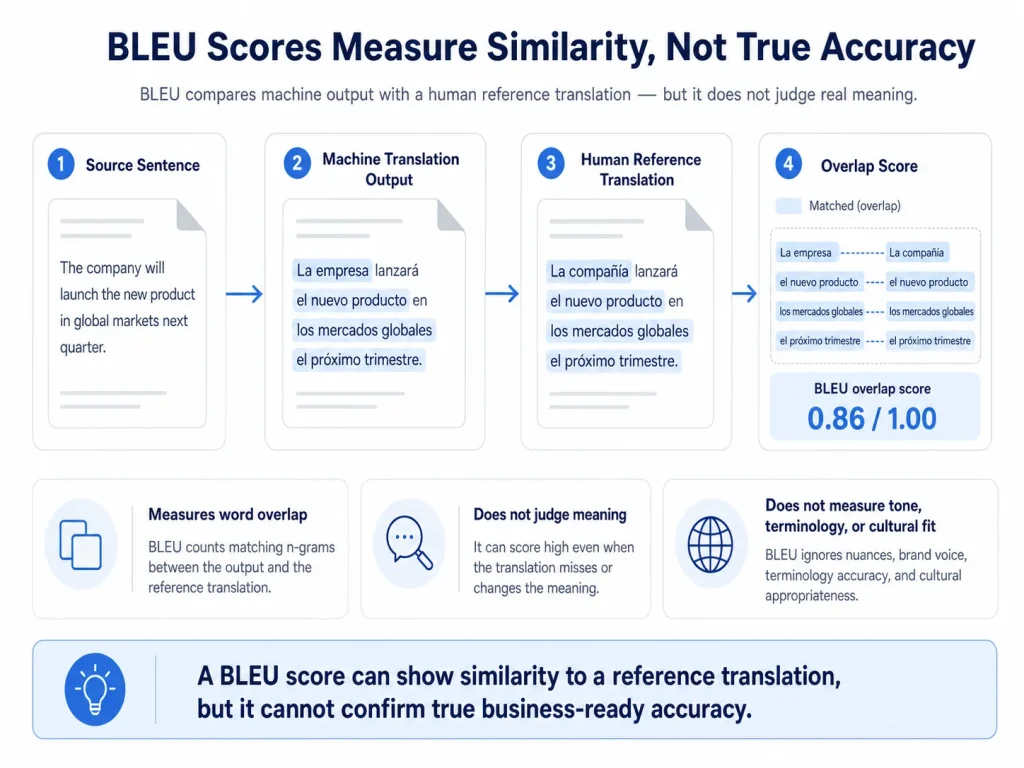
BLEU (Bilingual Evaluation Understudy) is the most common way researchers measure machine translation quality. It scores how closely the MT output matches a human reference translation, on a scale from 0 to roughly 60.
A perfect score of 100 would mean a word-for-word match with the human translation. In practice, modern MT scores range from 25 to 55, depending on the language pair.
Indicative Google Translate BLEU Scores by Language Pair
| Language Pair | Indicative BLEU | Human Parity Threshold | Notes |
|---|---|---|---|
| English → French | 45–55 | ~60 | High-resource pair; among GT’s strongest performances |
| English → Spanish | 45–55 | ~60 | Comparable to French; consistent NMT performance |
| English → German | 40–50 | ~55 | Compound words reduce fluency; OK for general content |
| English → Chinese | 35–45 | ~50 | Big structural divergence; OK for gist; not professional |
| English → Japanese | 25–35 | ~50 | Complex grammar + 3 scripts; needs human review |
| English → Arabic | 25–35 | ~50 | RTL + morphology + dialects; significantly lower quality |
| English → Korean | 25–35 | ~50 | Agglutinative grammar + SOV order; quality variable |
What BLEU scores don’t tell you?
- BLEU measures word overlap, not meaning. A translation can score well and still get the meaning wrong.
- BLEU compares against a single human reference translation, not against absolute accuracy.
- BLEU doesn’t measure terminology, register, or cultural fit.
- A BLEU score of 40 on EN→DE indicates it is useful for gist but needs professional post-editing for publication.
Google Translate and Data Privacy: What Happens to Your Documents in the Free Tool
When you paste content into the free Google Translate web tool, Google’s Terms of Service permit Google to use that data to improve its products. For confidential business documents, that’s a real risk most companies don’t think about.
What this means in practice
Submitting any of these to translate.google.com puts the content in a system that may retain and use it:
- A supplier contract with your pricing terms
- An NDA with a partner’s confidential information
- A product specification for an unreleased product
- An email containing customer’s personal data
GDPR exposure
If your content contains personal data like employee records, customer information, clinical trial data, HR records, submitting it to a free MT tool without a Data Processing Agreement (DPA) may breach GDPR Article 28. GDPR requires any third-party processing of personal data to be done under a written DPA with specific protections. The free Google Translate tool doesn’t provide one.
Google Cloud Translation API is different
Google Cloud Translation API is a paid enterprise version. This is a separate product with its own terms. Data submitted through the API is not used to train Google’s models by default under the enterprise terms. For B2B teams that want MT at scale with proper data protection, the Cloud API under a DPA is the right choice. The free web tool is not.
How Circle Translations handles MTPE data
- All MTPE projects run under NDA + GDPR-compliant DPA
- The MT engine we use does not train on client content
- Source files are deleted within 30 days of project completion
Google Translate Accuracy by Content Type
Google Translate’s accuracy isn’t fixed. It varies by content type, and the variation is predictable enough to use as a decision tool.
Here’s where Google Translate is fine, where it gets risky, and where it’s a liability:
Google Translate Accuracy by Content Type
| Content Type | GT Accuracy | Business Risk | Recommended Approach | Why |
|---|---|---|---|---|
| Simple general text (emails, news, informal docs) | HIGH (85–94%) | LOW | GT for gist; MTPE for publication | Common vocabulary; low ambiguity |
| Technical documentation (specs, manuals, SDS) | MEDIUM (70–85%) | MEDIUM-HIGH | MTPE minimum; human for safety-critical | Technical terms, units, and safety wording need precision |
| Legal contracts and agreements | LOW (60–75%, errors plausible) | CRITICAL | Human translation only | Defined terms, modals, negation — all error-prone; errors invisible to non-lawyers |
| Medical and pharma (PILs, clinical docs) | LOW–MEDIUM (variable) | CRITICAL | Human translation; regulatory bans raw MT | MedDRA terminology; dosage; contraindications — wrong terms = compliance failure |
| Marketing and brand copy | LOW for brand fit | HIGH | Transcreation or human + style guide | GT produces generic, flat output; no brand voice; no cultural adaptation |
| E-commerce product descriptions (functional) | MEDIUM-HIGH (75–90%) | LOW–MEDIUM | MTPE with native post-editor | Structured patterns help GT; brand terms still need a termbase |
| Website core pages (homepage, about, services) | MEDIUM (70–85%) | HIGH | Human translation | ‘Sounds translated’ damages the brand; SEO keywords missed |
| Financial reports and statements | MEDIUM (75–85%) | HIGH | Human for client-facing and filings | Financial vocab mostly OK; complex constructions slip; regulatory accuracy needs human |
| HR and employment contracts | LOW–MEDIUM (65–80%) | CRITICAL | Human translation | Labour law terms; jurisdictional concepts; legal accuracy required |
Why Google Translate Fails on Legal Content — The 5 Specific Failure Modes
Legal content is where Google Translate produces the most commercially dangerous errors. It is not because the output is obviously broken, but because it sounds right even though it is wrong.
Here are 5 specific ways Google Translate breaks legal documents. Every organization’s legal team should know these:
1. Defined terms get inconsistent
Contracts define key terms in a definitions clause. From that point onward, the term has a specific meaning. Google Translate doesn’t know “Intellectual Property Rights” is a defined term. It translates it as ordinary language, picking whichever option is statistically most likely each time. Three different translations of a single 30-page contract create three distinct legal concepts, whereas the contract intended one.
2. Obligation modals lose their weight
Legal English distinguishes “shall” (mandatory), “may” (permission), “should” (expectation), and “must” (absolute). Each one creates a different legal duty. Google Translate often flattens these into one common equivalent in the target language — picking the most frequent option, not the legally correct one.
3. Negation can disappear
NMT occasionally drops or moves negation in complex sentences. “The Purchaser shall not be liable for…” becoming “The Purchaser shall be liable for…” reverses the entire liability clause. The error sounds plausible. A non-native reviewer won’t catch it.
4. Legal register goes flat
Legal documents have their own register, including formal constructions, the passive voice, Latin phrases (e.g., force majeure, indemnification, inter alia), and jurisdiction-specific vocabulary. Google Translate uses general-language equivalents. The output sounds wrong to any reviewing lawyer.
5. Legal concepts don’t match across jurisdictions
English “consideration”, a required element of contract formation in common law, has no direct equivalent in civil law systems. Google Translate produces a linguistically plausible translation that’s legally incorrect for the target jurisdiction.
What this means for your organization
A contract translated by Google Translate without professional review can contain misrendered liability clauses, inconsistently defined terms, ambiguous obligations, and register failures that a lawyer spots in seconds. Any of these can affect enforceability.
When Google Translate Is Good Enough: 5 Use Cases
Being honest about what Google Translate does well matters as much as listing where it fails. It’s a genuinely useful tool, for the right job.
Here are 5 use cases where Google Translate delivers real value:
1. Understanding incoming content
You receive an email, document, or web page in a language you don’t speak. Google Translate gives you enough understanding to decide how to respond and who to involve. For triage, a supplier email, an inbound inquiry, or a reference document. It’s accurate, fast, and free.
2. Cross-checking professional translations
When you’ve received a professional translation back, running a specific section through Google Translate as a second opinion is a fair quality check. It doesn’t replace professional review. It does help non-linguists confirm that the translated content broadly matches the source.
3. High-volume functional content with MTPE
Large catalogs of product descriptions, FAQ pages, and internal docs are perfect for MTPE. Google Translate (or an enterprise MT API) as the first draft, followed by professional native-language post-editing. Significantly cheaper and faster than full human translation, with quality that’s actually publishable.
4. Research and competitive intelligence
Monitoring foreign-language competitor sites, market reports in target-market languages, or industry news in non-English markets. Google Translate is fine for extracting strategic insight. The output doesn’t need to be publication quality. It just needs to support a decision.
5. Informal internal communications
Multilingual teams coordinating on non-critical operational matters such as scheduling, logistics, and social messages. Google Translate effectively bridges the gap.
What these cases share
- The output is not published or sent to external parties as your work
- An error doesn’t create legal, regulatory, commercial, or safety consequences
- The reader knows they’re looking at unverified machine translation, not professional translation
Google Translate vs DeepL vs Professional Translation vs MTPE
The right approach for B2B isn’t a single tool. It’s a tiered choice based on content type, language pair, and the cost of an error.
Use this matrix as a decision tool:
B2B Translation Decision Matrix
| Use Case | Recommended | Why Not Raw GT | Cost Reference |
|---|---|---|---|
| Gist understanding of incoming content | Raw GT | — | Free |
| Internal non-critical communications | Raw GT or MTPE | — | Free or low cost |
| High-volume e-commerce product descriptions | MTPE | Needs native quality check + brand termbase | $0.07–0.12/word (vs $0.12–0.18 human) |
| Website core pages (homepage, about, services) | Human translation | Generic, ‘sounds translated’ output damages brand | $0.12–0.18/word |
| Marketing campaigns, taglines, brand copy | Transcreation | Accurate but flat; no brand voice | Per project |
| Legal contracts and agreements | Human only | Register, defined terms, modals, negation — all unsafe | $0.16–0.25/word |
| HR and employment documents | Human translation | Labour law terminology + jurisdictional concepts | $0.14–0.20/word |
| Pharmaceutical and medical labelling | Human + regulatory QA | Regulatory submissions ban raw MT | $0.18–0.35/word |
| Technical documentation for APAC | MTPE minimum; human preferred for JP/CN/KR | CJK accuracy too low for direct use | $0.12–0.25/word |
| Regulatory compliance documents | Human translation | Plain language + authority terminology | $0.14–0.22/word |
Google Translate vs DeepL vs ChatGPT: How These Tools Compare for Business Content
Google Translate, DeepL, and ChatGPT are the 3 tools most B2B buyers compare. Each has strengths. Each has gaps.
Google Translate vs DeepL
DeepL consistently beats Google Translate on European language pairs. The output is more fluent and idiomatic, and it uses a better register for formal business content. Mainly for German, French, Polish, Spanish, and Italian. Independent quality studies and professional translators rate DeepL higher for European fluency.
But DeepL covers about 30 languages. Google Translate covers more than 130. For APAC languages (Japanese, Chinese, Korean, Thai), Google Translate generally has more training data and comparable or better performance. For low-resource languages, Google Translate is often the only option.
LLM-based translation (ChatGPT, GPT-4, Claude)
- Better context handling — LLMs work across paragraph and document level, not just sentence by sentence
- Instruction-following — you can prompt them with style rules, termbase requirements, and register specifications
- Consistency limits — still struggle with terminology consistency across long documents without explicit termbase prompting
- Same data privacy concern — the free ChatGPT tool retains data; enterprise APIs offer better terms
Practical takeaways for B2B
- European content, moderate quality needs: DeepL Free or Pro beats Google Translate
- Wide language coverage, especially APAC: Google Translate still wins
- Complex content with style rules: well-prompted LLM translation may beat standard NMT
- Anything for external publication or with legal/regulatory consequences: MTPE or human translation, no exceptions
Is DeepL 100% accurate?
The answer is no. DeepL has the same fundamental NMT limitations as Google Translate. Statistical probability isn’t semantic accuracy; it produces fluent but wrong output in specialized domains and lacks termbase enforcement. It still requires professional post-editing for publication-quality work.
What MTPE Is and How It Bridges Machine Translation to Professional Quality
MTPE stands for machine translation post-editing. It is the workflow that turns raw MT output into publication-quality content. Cheaper than human translation, faster than human translation, and significantly better quality than raw MT.
How MTPE works — 5 steps
- Pre-production setup — your termbase (preferred and forbidden vocabulary) and style guide are loaded into the project before any translation runs. This improves the MT output before the post-editor even sees it.
- MT first draft — content goes through an enterprise MT engine (Google Cloud Translation API, DeepL API, ModernMT, or a custom-trained engine) inside a CAT tool with your termbase and translation memory active.
- Post-editing pass — a professional native-language translator reviews the MT output segment by segment, fixes errors, enforces the termbase, adapts cultural references, and applies the style guide.
- QA pass — automated QA (Xbench or Verifika) checks completeness, number accuracy, terminology, and tag integrity before delivery.
- TM update — approved post-edited segments are saved in the translation memory. Future similar projects cost less and turn around faster.
MTPE vs full human translation — time and cost
A full human translator produces around 2,000–2,500 words a day. A professional post-editor working on a well-configured MT draft produces 4,000–6,000 words a day, 2 to 3 times faster. At similar per-word rates, MTPE typically costs 40–60% of full human translation. For high-volume, recurring content, the savings compound across the program.
When MTPE works — and when it doesn’t
MTPE is right for:
- High-volume functional content with recurring patterns
- Content with high TM leverage
- Content where brand voice is a moderate priority and accuracy risk is moderate
MTPE is NOT right for:
- Legal contracts
- Pharmaceutical regulatory submissions
- Confidential content where the source can’t be sent to an MT engine without NDA + DPA
- Highly creative content (taglines, brand campaigns) where transcreation is needed
Circle Translations’ MTPE programme
- Enterprise MT engine — not free-tool MT; no client content used for model training; NDA + DPA standard
- Termbase configured pre-production — MT quality improved before post-editing
- Native-language post-editors — verified L1 speakers with domain expertise, not bilingual generalists
- ISO 17100-aligned QA — automated + human review before delivery
- TM accrual — post-edited segments saved to your client-owned TM; match discounts on future work
How to Decide: A 3-Question Framework for Choosing Your Translation Tool
The choice between raw Google Translate, MTPE, and full human translation comes down to 3 questions.
Question 1: Is this content intended for use outside your organization?
- YES → don’t use raw Google Translate. Move to Question 2.
- NO (internal triage or gist only) → Google Translate is fine.
Question 2: Does an error create legal, regulatory, commercial, or safety risk?
- YES → human translation required. MTPE not appropriate.
- NO → move to Question 3.
Question 3: Is the volume high enough to make the MTPE setup pay back?
- Volume ≥ 5,000 words per batch OR ongoing program → MTPE works. Configure termbase, style guide, MT engine, and engage post-editors.
- For volumes < 5,000 words and one-offs, full human translation is more efficient. The MTPE setup cost isn’t justified.
Quick reference
- Raw GT: internal triage, gist understanding, research monitoring. Not for: external content, legal documents, regulated content, brand content.
- MTPE: high-volume functional content, e-commerce catalogs, FAQ, and help docs, operational comms. Not for: legal contracts, pharma regulatory, highly creative brand content, confidential content without DPA.
Full human translation: all legal, regulatory, and compliance content; core website and brand content; APAC complex language pairs; certified translation; anything where a quality failure has consequences.
If Google Translate is currently handling content that affects your legal exposure, your brand credibility, or your regulatory compliance, it’s time to upgrade the workflow.
Circle Translations offers two routes:
Route A — MTPE (for high-volume functional content)
Route B — Full human translation (for legal, regulated, brand, and APAC complex-language content)
Share with us your content type, language pair, volume, and quality requirement. We’ll recommend the right service tier and provide an accurate quote within 1 business hour.
Get a Translation Quote → View MTPE Services → View Translation and Localisation Services
Frequently Asked Questions
What percentage of Google Translate is accurate for business documents?
Google Translate is approximately 85–94% accurate for common European language pairs (English-Spanish, English-French, English-German) on general text. For business-specific content, the accuracy rate drops sharply.
Is Google Translate good enough for translating business contracts?
No. Google Translate is not suitable for business contracts. It might give you some ideas about the content, but not the accuracy. Legal documents contain defined terms that must translate consistently throughout, obligation modals (shall, may, must) that carry different legal weight, complex conditional constructions, and jurisdiction-specific concepts.
Is DeepL more accurate than Google Translate?
For European language pairs, DeepL generally produces more fluent and natural-sounding output than Google Translate.
DeepL was initially focused on European languages — German, French, Polish, Spanish, Italian — and independent quality studies and professional translator feedback consistently rate it higher than Google.
Does Google Translate use AI?
Yes. Google Translate has used neural machine translation (NMT), a deep learning AI approach, since 2016. The system uses a transformer-based neural network to encode the source sentence and generate the target translation probabilistically. Google upgraded to its Multitask Unified Model (MUM) in 2021 and has continued improving with large-scale transformer architectures. The 2016 switch from phrase-based translation to NMT produced the biggest single quality jump.
Is it safe to use Google Translate for confidential business documents?
No. The free Google Translate web tool creates a real data privacy risk for confidential content.
Google’s Terms of Service permit data submitted to the free tool to be used to improve Google’s products. For documents containing commercially sensitive pricing or strategy information, customer personal data (GDPR-regulated), IP or trade secrets, or legally privileged communications, the free tool is not appropriate.
How accurate is Google Translate for Japanese?
Google Translate’s English-to-Japanese performance is significantly less accurate than its European language pairs, scoring around 25–40 on BLEU, versus 45–55 for English-to-French or English-to-Spanish.
What is the most accurate translation tool for business use?
No automated translation tool is reliably accurate enough for high-stakes business content without professional human review. But DeepL Pro, Google Cloud Translation API, etc., are types of tools that provide moderate accuracy.
Can I use ChatGPT for business translation instead of Google Translate?
ChatGPT and other LLM-based translation tools can produce better contextual coherence than standard NMT for some content types, particularly longer texts where document-level context matters.
Advantages over Google Translate include longer context windows, the ability to follow style instructions, and a better selection of formal register with appropriate prompting.