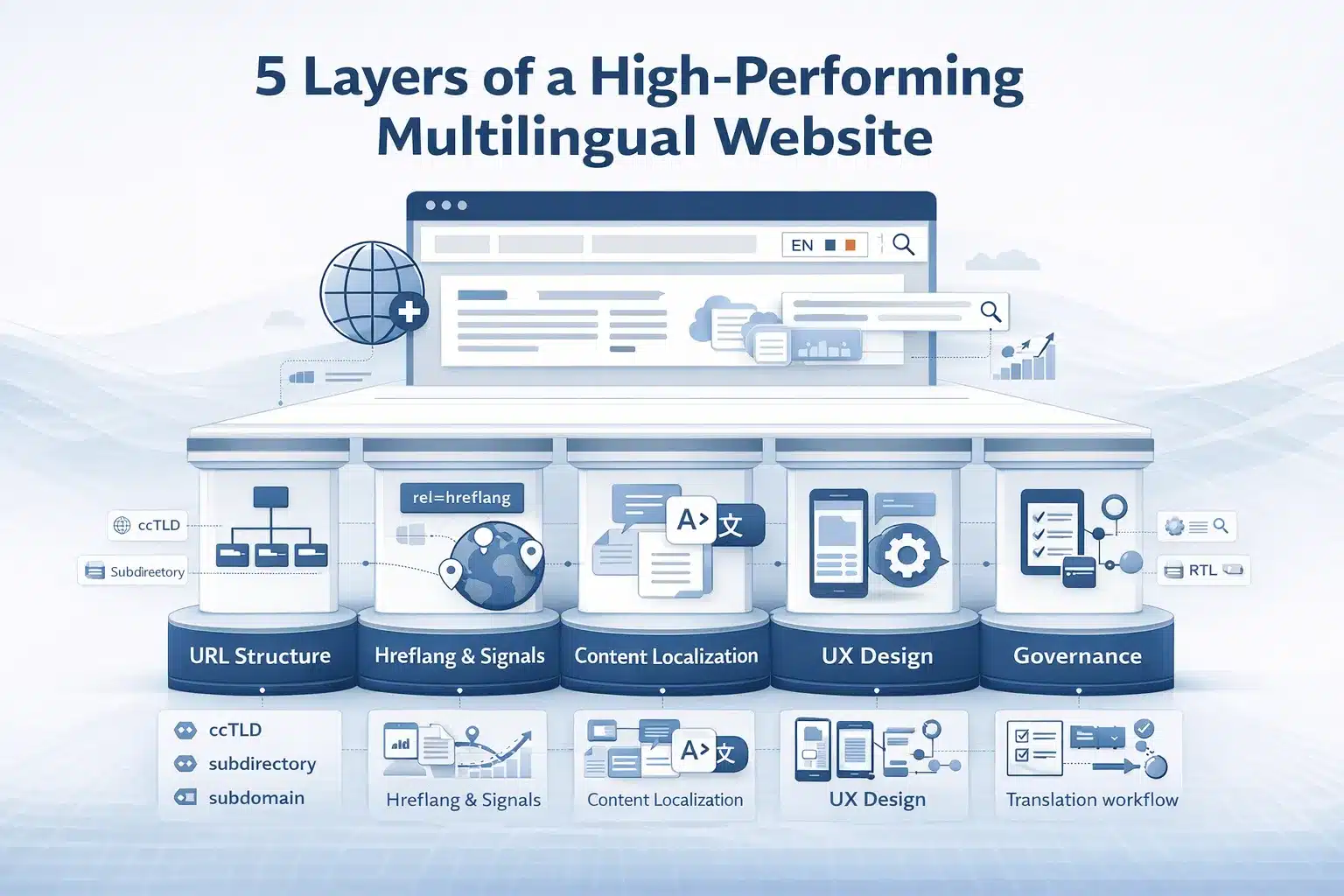
Building a multilingual website requires more than translating pages into other languages. To rank internationally, five layers must work together: technical structure, search signals, content localization, UX design, and governance. If one layer fails, the multilingual site will not perform correctly in search or for users.
Multilingual website best practices cover five interdependent layers: URL structure (subdirectory, subdomain, or ccTLD choice), hreflang implementation (language and region signalling to Google), localized keyword research (not translated keywords), UX design (language switcher, text expansion, RTL support), and content governance (translation workflow, TMS integration, update synchronisation).
A site is correctly translated but still surfaces wrong-language pages in search results. A site with perfect hreflang but machine-translated content earns no rankings.
Many organisations treat multilingual expansion as a translation task and overlook the technical and governance layers. The result is wrong-language pages ranking in search, duplicate content conflicts, and translated pages falling behind the source site.
This guide explains how to implement each layer correctly so that multilingual websites rank, scale, and remain consistent across markets.
As Aleyda Solis (2018) explains in International SEO: Strategies for Optimizing Websites in Multiple Countries and Languages, “International SEO requires not only translation but also proper technical implementation and targeting to ensure that the right content is shown to the right audience,” highlighting that multilingual success depends on both linguistic and technical execution.
Multilingual Website Strategy: Market Selection, Language Scope, and the Decisions You Cannot Reverse
Three planning decisions made before translating a single page are difficult to change later: URL structure, target market scope, and the content governance model. Mistakes at this stage create technical debt that multiplies with every new language added, making SEO, maintenance, and scaling significantly harder.
How to Identify Which Languages and Markets Justify Translation Investment
Most multilingual website projects fail ROI analysis because languages are selected based on internal preference instead of market data. A defensible selection uses four inputs: traffic data, local search demand, localization cost, and competitive density in the target SERP.
First, review Google Analytics 4 geo traffic. Countries generating more than about 3 percent of organic traffic without a local-language site indicate unmet demand.
Second, validate search demand in the target language using Google Keyword Planner set to the specific country and language. Direct translations of English keywords often have little search volume.
Third, compare revenue opportunity versus localization cost. Latin-script markets such as French, German, Spanish, and Italian usually provide the best cost-to-return ratio.
Fourth, analyse SERP competition. If the top results are established local domains, ranking requires a longer timeline and sustained SEO investment.
Practical output
| Language | Estimated search demand | Competitive KD average | Estimated localization cost | Estimated timeline to ROI |
| French | High | Medium | Medium | 6–9 months |
| German | Medium–High | Medium | Medium | 6–12 months |
| Spanish (EU) | High | Medium–High | Medium | 6–12 months |
Launch with two or three high-scoring markets first and establish governance before expanding.
Multi-Regional vs Multilingual Websites: Understanding the Distinction Before Choosing Your Structure
Google distinguishes between multilingual and multi-regional websites, and each requires different technical signals.
A multilingual website serves the same content in multiple languages. Example: a French section at /fr/ serving French-speaking users globally.
A multi-regional website targets users in different countries, even if the language is the same. Example: separate English versions for the UK and the US with different pricing or legal terms.
Many enterprise sites combine both.
| Locale | Target market |
| fr-fr | French speakers in France |
| fr-ca | French speakers in Canada |
| en-ca | English speakers in Canada |
This structure requires separate hreflang tags and canonical relationships for each page variant.
The distinction matters for URL structure. Purely multilingual sites often use language subdirectories such as /fr/ or /de/. Multi-regional sites may require ccTLDs like .fr or locale paths such as /fr-fr/.
Google geotargeting signals
| Signal | Strength |
| ccTLD | Strongest |
| Subdirectory with hreflang + GSC targeting | Moderate |
| IP-based detection | Not recommended |
Defining localization Scope: What Must Be Translated vs What Can Be Kept in Source Language
Another early planning decision is defining which parts of the site require full localization and which do not. Not every element needs full translation, but key user-facing content always does.
Full localization required
| Element | Reason |
| Core product and service pages | Primary conversion content |
| Navigation and global UI | Required for usability |
| Meta titles and descriptions | Important for SEO |
| URL slugs | Improve relevance in local SERPs |
| Forms and validation messages | Required for usability |
| Legal pages | Often required by regulation |
Adaptation recommended
| Element | Approach |
| Marketing headlines | Transcreation rather than literal translation |
| Case studies and testimonials | Use local customer examples |
| Images with embedded text | Replace with localized assets |
May remain in source language
| Element | Condition |
| Developer documentation | If the audience works in English |
| Internal admin interfaces | If used only by internal teams |
Compliance note: In EU markets, GDPR requires privacy notices to be available in the user’s language. In regulated industries such as finance, healthcare, or pharmaceuticals, local-language content may be legally required.
Multilingual Website URL Structure: ccTLD vs Subdomain vs Subdirectory Compared
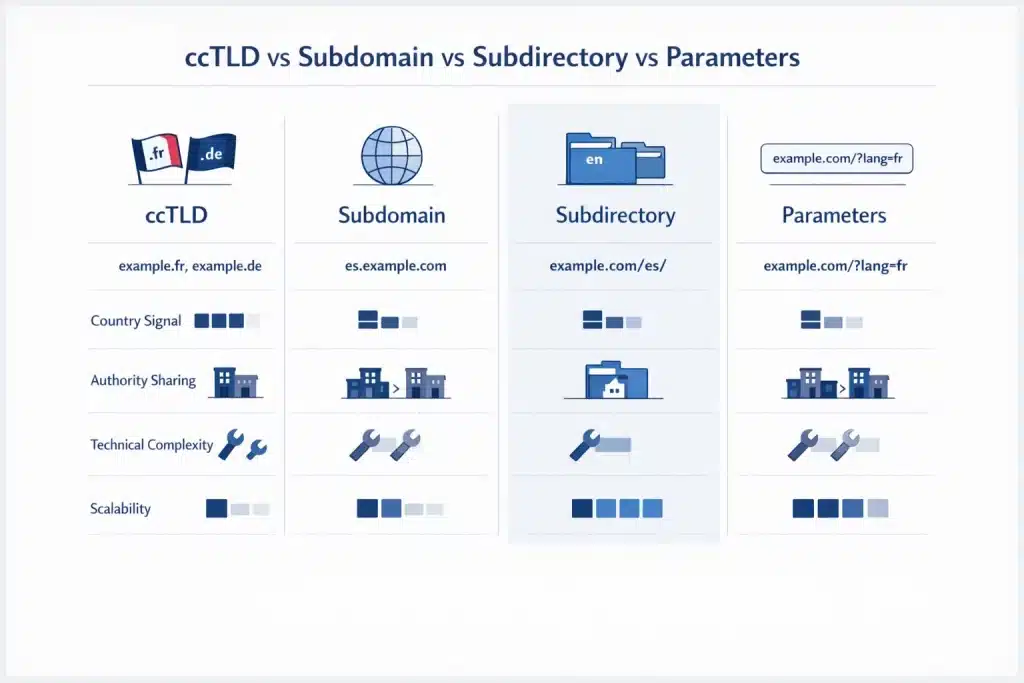
URL structure is the most important technical decision in a multilingual website architecture. It determines how search engines interpret language and country targeting, how SEO authority is distributed across versions, how complex the site becomes to maintain, and how easily additional languages can be added later.
| Method | Example | Country/language signal | Authority consolidation | Technical complexity | Scalability |
| ccTLD | example.fr, example.de | Strongest country signal | Separate domain authority per market | Highest — separate domains, GSC properties, link building | Low — new domain per market |
| Subdomain | fr.example.com, de.example.com | Moderate | Partial authority sharing | Medium — separate configuration possible | Medium |
| Subdirectory | example.com/fr/, example.com/de/ | Moderate (requires hreflang or GSC targeting) | Strongest — shares root domain authority | Lowest | Highest — add a new folder per language |
| Parameter | example.com?lang=fr | Weakest — not recommended | Full | Low | Not recommended |
ccTLDs: When Country-Code Top-Level Domains Are Worth the Investment
Country-code top-level domains such as .fr, .de, .es, or .co.uk send the strongest possible country signal to Google. For enterprises with dedicated country operations and local marketing teams, ccTLDs can provide strong localization credibility and clear geotargeting.
ccTLDs are justified when each market operates semi-independently, with different products, pricing structures, or legal frameworks. In some European markets, local users also trust national domains more than global .com domains.
However, ccTLDs come with significant operational overhead. Each domain starts with zero authority, requires separate Google Search Console properties, and needs its own link-building campaign. Infrastructure and maintenance costs also increase because each market effectively runs as a separate site.
For most B2B organisations expanding internationally without independent country teams, a subdirectory structure delivers faster SEO results because all language versions share the authority of the main domain.
Subdirectories: The Recommended Default Structure for B2B Multilingual Sites
For most B2B organisations launching multilingual websites, subdirectories are the recommended default structure. Google explicitly supports and recommends this approach because it consolidates domain authority and simplifies technical management.
In a subdirectory structure, every language version lives under the main domain. This means backlinks to the root domain strengthen every language section automatically. It also keeps crawl management and indexing under a single Search Console property.
Subdirectory implementation checklist
| Requirement | Example |
| Use ISO 639-1 language codes | /fr/, /de/, /es/ |
| Use locale variants where needed | /fr-fr/, /fr-ca/, /es-mx/ |
| Configure geotargeting signals | hreflang tags or GSC targeting |
| Implement x-default fallback | default language page |
| Translate URL slugs | /fr/services-de-traduction/ |
Link
/content/website-translation-services
/blog/localization-vs-translation
URL Slug Translation: Why Translated Slugs Outperform English Slugs in Non-English SERPs
A commonly overlooked multilingual SEO practice is translating URL slugs for each language version. Search engines use URL text as a localization and keyword relevance signal.
A French user searching “services de traduction” is more likely to click a result containing /fr/services-de-traduction/ than /fr/translation-services/. Matching the user’s language in the URL improves both relevance signals and click-through rate.
Best practices for translating slugs
| Rule | Explanation |
| Translate the meaning, not the literal wording | Match local search vocabulary |
| Use hyphens as separators | Avoid underscores |
| Avoid special characters | Use ASCII-safe versions |
| Maintain slug glossary in TMS | Ensures consistent mapping |
| Update internal links and hreflang | Prevents tag mismatch errors |
Hreflang Implementation: The Complete Step-by-Step Guide for Multilingual and Multi-Regional Sites
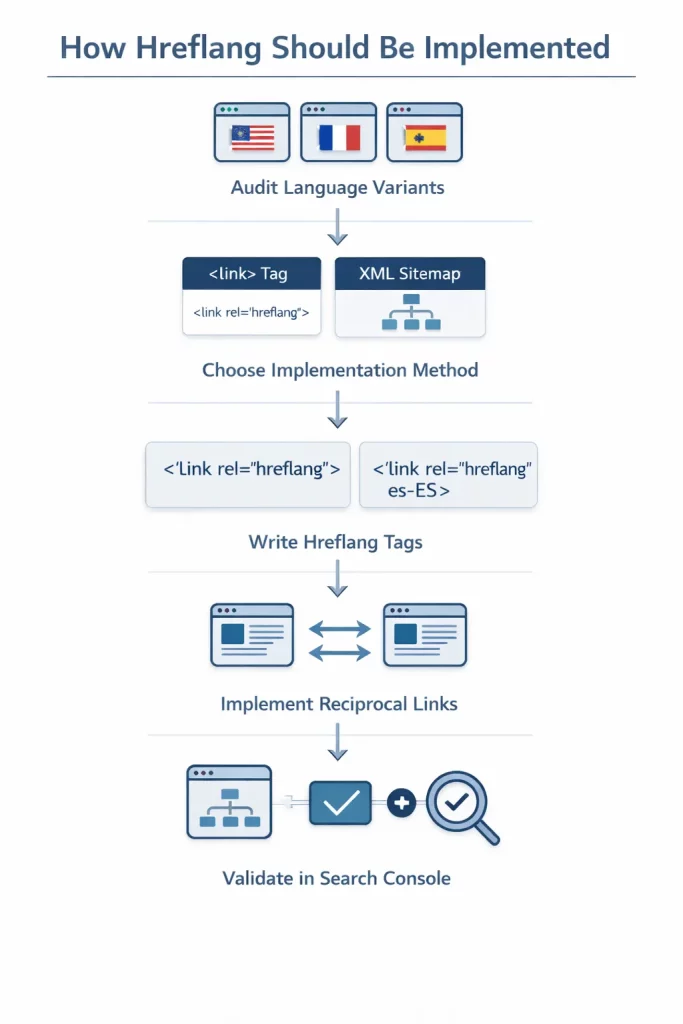
Hreflang is the HTML or XML attribute that tells Google which language and region a page targets and which pages are equivalent across languages. Incorrect hreflang implementation is the most common technical failure on multilingual websites.
Step-by-Step Hreflang Implementation
Step 1 — Audit language variants
Create a list of every page and identify all language or locale versions. Each page must reference all other variants including itself. Partial hreflang sets are ignored by Google.
Step 2 — Choose an implementation method
Three methods exist.
| Method | Best use case |
| HTML head tags | Small sites and simple implementations |
| XML sitemap | Large sites with hundreds of pages |
| HTTP header | Non HTML files such as PDFs |
For most large sites the XML sitemap method is recommended because it centralises all hreflang declarations.
Step 3 — Write correctly formatted tags
Each tag includes three attributes.
| Attribute | Purpose |
| rel=”alternate” | Indicates alternate language version |
| href=”full URL” | Absolute URL of the page variant |
| hreflang=”language code” | Language or locale identifier |
Examples
hreflang=”fr”
hreflang=”fr-fr”
hreflang=”fr-ca”
hreflang=”x-default”
Step 4 — Implement reciprocal tags
Every page must reference all variants.
| Page | Must reference |
| English page | English, French, German |
| French page | French, English, German |
| German page | German, English, French |
If reciprocity is missing, Google ignores the entire set.
Step 5 — Validate in Google Search Console
Submit the XML sitemap in Search Console and check the International Targeting report for errors. Revalidate after URL changes, CMS migrations, or when new languages are added.
Hreflang Tag Syntax, BCP 47 Language Codes, and the x default Tag Explained
Hreflang syntax uses ISO 639-1 language codes combined with optional ISO 3166-1 country codes, formatted according to BCP 47 standards. Language codes are lowercase and country codes are uppercase, separated by a hyphen.
Common hreflang tag examples
| Tag | Targets |
| en | English globally |
| en-us | English United States |
| en-gb | English United Kingdom |
| en-au | English Australia |
| fr | French globally |
| fr-fr | French France |
| fr-ca | French Canada |
| de | German globally |
| de-at | German Austria |
| de-ch | German Switzerland |
| zh-hans | Chinese Simplified |
| zh-hant | Chinese Traditional |
| ar | Arabic |
| x-default | Default fallback page |
The x default tag specifies which page should be shown when the user’s browser language does not match any available version. This usually points to the English root page or a language selection page.
Common syntax errors include using incorrect code formats such as en-EN, using full language names instead of codes, placing tags outside the HTML head, or using relative URLs.
Link
/content/website-translation-services
The 7 Most Common Hreflang Errors That Kill Multilingual SEO and How to Fix Them
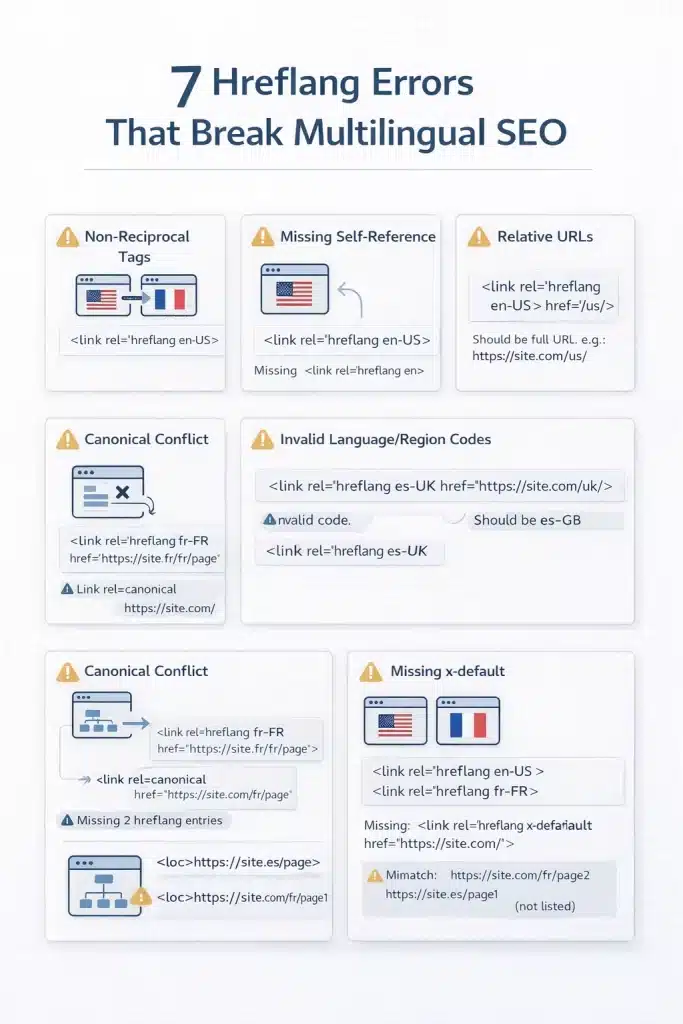
Hreflang is strict. A partially implemented set can cause Google to ignore the entire configuration and show the wrong language page in search results.
| Error | What it looks like | What Google does | How to fix |
| Non-reciprocal tags | Page A links to Page B, but not vice versa | Ignores hreflang set | Ensure every page references every variant |
| Missing self-reference | Page references others but not itself | Tags may be ignored | Add a self-referencing tag |
| Relative URLs | href=”/fr/page.” | Tag ignored | Use absolute URLs |
| Canonical conflicts | Hreflang points to a non-canonical URL | Canonical overrides hreflang | Match canonical and hreflang URLs |
| Wrong BCP 47 format | hreflang=”english” or “en-EN” | Tag invalid | Use ISO codes like en or en-gb |
| Missing x default | No fallback page | Wrong language served | Add x-default tag |
| Sitemap HTML mismatch | Different URLs in sitemap vs HTML | Google ignores tags | Use one consistent implementation |
Common validation tools
| Tool | Use |
| Google Search Console | Detect hreflang errors |
| Screaming Frog | Technical hreflang audit |
| Semrush Site Audit | International SEO checks |
| Ahrefs Site Audit | Hreflang validation |
Multilingual SEO Content: localized Keyword Research, Translation Quality, and Avoiding Duplicate Content Penalties
Translating English content into other languages is only the starting point for multilingual SEO. Whether translated pages rank depends on three content factors: correct keyword localization, translation quality, and proper duplicate-content management across language versions.
localized Keyword Research: Why Translating English Keywords Produces the Wrong Target List
The most common multilingual SEO mistake is translating an English keyword list and using it as the target keyword set. Translated keywords are often different from the phrases native users actually search.
Direct translations frequently fail because search behaviour differs by language, translated phrases may have little search volume, and regional variations can change terminology. For example, Spanish speakers in Spain commonly search for “ordenador” while users in Mexico search for “computadora” for the same concept.
Correct keyword localization requires market-specific research.
| Step | Action |
| 1 | Identify the English keyword cluster |
| 2 | Open Google Keyword Planner with target country and language |
| 3 | Enter translated seed keywords |
| 4 | Review keyword ideas with real search volume |
| 5 | Analyse local SERPs to understand search intent |
| 6 | Build a separate keyword map for each language page |
Example
| English keyword | Literal translation | localized keyword example |
| translation services | services de traduction | traducteur en ligne |
Translation Quality for SEO: Why Machine Translation Alone Harms Multilingual Rankings
Translation quality directly affects SEO performance because low-quality machine translation creates specific ranking problems.
Users quickly recognise unnatural machine-translated text and leave the page, increasing bounce rates. Machine translation also focuses on linguistic accuracy rather than search intent, meaning the page may not contain the keywords people actually search for in that language.
Other issues include inconsistent terminology across pages and a lack of cultural adaptation, such as currency, examples, or units.
Recommended translation quality levels
| Content type | Recommended approach |
| Homepage, service pages, landing pages | Professional human translation |
| Blog and informational content | MTPE (machine translation plus human post-editing) |
| Legal or regulated content | Professional translation plus in-country review |
Google has confirmed that auto-translated content without human review may be treated as low quality. MTPE is acceptable, but publishing raw machine translation is not recommended.
Duplicate Content, Canonical Tags, and Hreflang: How to Prevent Cross-Language Penalty Risk
Translated pages share structural similarity, which search engines may interpret as duplicate content if canonical and hreflang signals are not implemented correctly.
Canonical tags define the preferred version of a page within the same language, while hreflang tags identify equivalent pages across different languages. Both must be used together.
Correct implementation pattern
| Page | Canonical | Hreflang |
| English page | example.com/en/services/ | References EN, FR, DE |
| French page | example.com/fr/services/ | References EN, FR, DE |
Common incorrect implementations
| Error | Result |
| Canonicalising all pages to English | Non-English pages removed from the index |
| Missing self canonical | Google may override page selection |
| Using hreflang without canonicals | Conflicting indexing signals |
Using noindex on translated pages is not a solution. If pages are not indexed, they cannot rank. Instead, translated pages should use self-canonical tags and be included in the hreflang set.
Multilingual Website UX: Language Switcher Design, Text Expansion, RTL Support, and Cultural Adaptation
A multilingual website can have correct SEO and good translation but still fail if users cannot easily switch languages, if layouts break after translation, or if cultural and formatting conventions feel foreign to the target audience.
Language Switcher Placement, Labelling, and the Flag vs Language Name Debate
The language switcher is usually the first element international visitors look for. If it is hard to find or unclear, users may assume no localized version exists.
Placement best practices
| Placement | Recommendation |
| Header top right | Best practice. Visible on every page |
| Mobile hamburger menu | Acceptable if near the top |
| Footer only | Not recommended as the primary location |
Labelling best practices
| Approach | Recommendation |
| Native language names | Use “Français”, “Deutsch”, “Español” |
| English names only | Avoid unless the interface is English |
| Flags only | Not recommended because flags represent countries |
| Globe icon | Common and neutral language selector symbol |
Language switchers should detect the browser Accept Language setting, but still allow manual override. Automatic redirects without user control are not recommended.
Link
/content/website-translation-services
Text Expansion, Font Selection, and Layout Resilience for Translated Content
Translated text rarely matches the length of the source text. Some languages expand significantly while others become shorter, which can break layouts designed only for English.
Typical text expansion relative to English
| Language | Typical expansion |
| German | +20 to 35 percent |
| French | +15 to 25 percent |
| Spanish | +15 to 20 percent |
| Italian | +15 to 25 percent |
| Russian | +10 to 20 percent |
| Arabic | −15 to 25 percent |
| Japanese or Chinese | −30 to 50 percent |
| Finnish | +30 to 50 percent |
Design requirements
| Element | Best practice |
| Navigation menus | Test with long German or Finnish labels |
| CTA buttons | Use flexible padding instead of a fixed width |
| Headlines | Use responsive font sizing |
| Forms | Prefer single-column layouts |
RTL languages such as Arabic or Hebrew require full layout inversion using the HTML dir=”rtl” attribute and CSS logical properties.
Link
/content/website-translation-services
Cultural localization Beyond Translation: Images, Currency, Date, and Trust Signals
Accurate translation alone does not create a fully localized website. Cultural elements such as imagery, currency, and formatting conventions must also match the expectations of the target market.
| Element | Common failure | Correct practice |
| Imagery | English-only audience photos | Use culturally neutral or local imagery |
| Currency | USD shown on EU pages | Use local currency and formatting |
| Date format | MM/DD/YYYY | Use DD/MM/YYYY or local standard |
| Units | Miles and pounds | Use metric units |
| Phone numbers | US format globally | Local format per country |
| Address fields | US order | Use local address structure |
| Social proof | US customers only | Include local customers |
| Legal pages | English only | Provide translated legal pages |
Marketing headlines and campaign copy often require transcreation, not literal translation, to preserve persuasive meaning.
Accessibility Across Languages: WCAG Compliance, Alt Text, and Language Attributes
Accessibility standards apply to every language version of a website. WCAG requirements do not change when content is translated.
Multilingual accessibility checklist
| Element | Requirement |
| HTML lang attribute | Set the correct language code on each page |
| Alt text | Translate and localise image descriptions |
| Form error messages | Translate all validation messages |
| Link text | Avoid vague links like “click here” |
| Documents and PDFs | Provide translated versions |
Screen readers rely on the HTML lang attribute to choose the correct pronunciation engine. A French page labelled as English will be read incorrectly.
In EU markets, cookie banners and privacy notices must appear in the language of the page to meet GDPR transparency requirements.
Multilingual Content Governance: TMS Integration, Translation Workflow, and Update Synchronisation
Content governance determines whether a multilingual website improves or degrades over time. Without a structured workflow linking the CMS to a translation process, translated pages quickly fall behind the source language, creating outdated content, inconsistent messaging, and declining SEO performance.
CMS Platform Considerations for Multilingual Websites: WordPress WPML, Drupal, Contentful, and Headless CMS Options
The CMS platform plays a major role in how multilingual content is managed, how translation workflows operate, and how hreflang tags are maintained as the site grows.
CMS multilingual capability comparison
| CMS | Multilingual approach | Hreflang automation | TMS integration | Best for |
| WordPress + WPML | Plugin based translation management | Automated | Connects to most TMS via API | SMB to mid market |
| WordPress + Polylang | Plugin based, simpler than WPML | Automated | Limited | Smaller multilingual sites |
| Drupal | Native multilingual module | Automated | Enterprise integrations | Enterprise and complex content |
| Contentful | Locale aware content model | Custom implementation | API first integrations | Enterprise and omnichannel |
| Sanity | Locale aware content modelling | Custom implementation | API first | Developer led projects |
| Webflow | Native localization feature | Automated | Limited | Marketing and design sites |
| Shopify | Shopify Markets localization | Automated | Native and third party | Ecommerce |
Key CMS selection criteria
| Question | Why it matters |
| Does the CMS link source and translated pages automatically | Ensures updates trigger translation workflows |
| Does the CMS generate hreflang automatically | Prevents manual hreflang maintenance |
| Can the CMS connect to a TMS via API | Eliminates manual copy paste translation workflows |
Translation Management System (TMS): What It Is, What It Does, and When a B2B Organisation Needs One
A Translation Management System (TMS) centralises the process of translating content from a source language into multiple target languages, with workflow control, translator assignment, review stages, and automated delivery back to the CMS.
Core TMS capabilities
| Feature | Purpose |
| Translation memory (TM) | Reuses previously translated segments to reduce cost |
| Glossary management | Maintains consistent terminology across pages and languages |
| Workflow automation | Routes content from CMS to translators and reviewers |
| Update detection | Identifies source content changes automatically |
When a TMS is typically required
| Scenario | Recommendation |
| 3 or more target languages | Implement a TMS |
| Frequent content updates | Implement a TMS |
| Multiple translators or agencies | Implement a TMS |
| Regulated industries requiring terminology consistency | Implement a TMS |
When manual workflows may be sufficient
| Scenario | Recommendation |
| One target language | Manual process acceptable |
| Infrequent updates | Manual process acceptable |
| Pilot multilingual project | TMS optional |
Common TMS platforms include Phrase, Smartling, Transifex, Crowdin, XTM, memoQ, and Lokalise.
Content Update Synchronisation: How to Keep All Language Versions Current When Source Content Changes
Content synchronisation ensures translated pages stay aligned with the source language version. Without a defined update workflow, translated pages quickly become outdated, which reduces user trust and weakens SEO performance.
Typical governance failure occurs when the source content team updates English pages but does not trigger the translation process.
Content synchronisation workflow
| Step | Action |
| 1 | Track source content changes in the CMS |
| 2 | Prioritise updates (critical, standard, cosmetic) |
| 3 | Trigger translation updates through a TMS or workflow |
| 4 | Review translated content before publishing |
| 5 | Conduct monthly audits comparing source and translated versions |
Update prioritisation example
| Update type | Response time |
| Critical (pricing, product features, legal text) | Within 48 hours |
| Standard (blogs, case studies) | Within 5 to 10 days |
| Cosmetic (minor edits) | Batch monthly |
Assign a specific owner for the synchronisation workflow. Without clear responsibility, multilingual content maintenance typically fails.
How to Rank a Multilingual Website in Specific Countries: Geotargeting, Link Building, and Search Console Configuration
Correct technical implementation creates the foundation for multilingual SEO. However, ranking in a specific country’s Google also requires country targeting signals, local link authority, and proper monitoring of performance by language and market.
Google Search Console International Targeting: How to Configure Geotargeting for Subdirectory-Based Sites
For sites using subdirectories such as /fr/ or /de/, Google cannot infer country targeting from the URL alone. Geotargeting signals must come from hreflang and Search Console configuration.
Step-by-step configuration
| Step | Action |
| 1 | Log in to Google Search Console for the root domain |
| 2 | Open Legacy tools and reports → International Targeting |
| 3 | Select the Country tab |
| 4 | Configure the country targeting option if required |
| 5 | Use hreflang locale tags (fr-fr, fr-ca) for subdirectory targeting |
Important notes
| Factor | Explanation |
| Hreflang tags | Primary signal for language and region targeting |
| GSC targeting | Secondary signal supporting hreflang |
| Language only tags | hreflang=”fr” serves French speakers globally |
Best practices for monitoring multilingual sites
| Action | Purpose |
| Submit separate XML sitemaps per language | Easier indexing monitoring |
| Review Coverage report | Detect indexing issues by language |
| Use URL Inspection | Confirm correct language page indexing |
Link
/content/website-translation-services
International Link Building: How to Earn Country-Specific Authority for Non-English Pages
Root domain authority helps multilingual pages rank, but strong rankings in country-specific SERPs require links from websites in that country and language.
Google’s ranking systems treat local language backlinks as a signal of regional relevance. For example, a German page with links from .de industry sites will often outperform a similar page supported only by English backlinks.
Effective multilingual link-building strategies
| Strategy | Description |
| Local media outreach | Pitch stories to local trade publications |
| Local business directories | Submit to country-specific directories |
| Competitor link analysis | Replicate links earned by local competitors |
| Local partnerships | Collaborate with regional partners |
| localized PR assets | Promote translated studies or reports |
These links strengthen local relevance and help search engines associate a page with its target market.
Monitoring Multilingual SEO Performance: Metrics, Tools, and Language Segmented Reporting
Performance analysis for multilingual websites must be segmented by language version. Aggregated reports hide issues affecting individual markets.
Multilingual monitoring framework
Google Search Console segmentation
| Action | Purpose |
| Filter by URL path (/fr/, /de/, /es/) | View search performance by language |
| Monitor Index Coverage | Detect indexing problems |
| Check hreflang reports | Identify technical errors |
Google Analytics segmentation
| Metric | Why it matters |
| Organic sessions by language | Measures growth in each market |
| Conversion rate | Detects UX or localization issues |
| Engagement time | Indicates content quality |
Rank tracking tools should also be configured per country.
| Tool | Capability |
| Semrush | Country specific keyword tracking |
| Ahrefs | localized SERP monitoring |
| Moz | Regional keyword tracking |
Key monthly metrics to monitor
| Metric | Target |
| Organic traffic by language | Upward growth trend |
| Keyword rankings | Improvement in the target country SERPs |
| Hreflang errors | Zero errors |
| Content freshness | Translated pages within 30 days of source |
| Conversion rate | Comparable across languages |
Build Your Multilingual Website on a Foundation That Ranks — Professional Translation for Every Layer
Circle Translations delivers the translation layer your multilingual website strategy requires. We provide SEO-aligned, culturally adapted, and TMS-integrated localization designed to support international search visibility and conversion.
Every website localization engagement includes
✓ localized keyword research for each target market — not translated English keywords
✓ Professional human translators with sector expertise in each language
✓ Transcreation for marketing headlines, CTAs, and campaign copy
✓ Translation memory and glossary management for terminology consistency
✓ TMS-compatible delivery (Phrase, Smartling, Transifex, Crowdin, XTM, Lokalise) integrated with your CMS workflow
✓ MTPE option for high-volume blog content — typically reducing costs by 35–50%
✓ GDPR-compliant handling of any personal data in submitted materials
Request a website localization consultation. We review your multilingual setup and identify gaps before translation begins.
Ready to Reach Global Audiences Without Losing SEO Ground?
Circle Translations helps you build a multilingual website that’s optimized for hreflang, structured for search engines, and localized to convert — in 100+ languages.
Frequently Asked Questions — Multilingual Website Best Practices
How do I convert my existing website to support multiple languages?
Convert an existing website in five steps. Choose a URL structure (subdirectories like /fr/ or /de/ are usually best), enable multilingual support in your CMS, translate core pages such as services and navigation, implement hreflang tags including self-references and an x-default tag, and submit updated XML sitemaps to Google Search Console.
What is the difference between multilingual SEO and international SEO?
Multilingual SEO focuses on optimising content in multiple languages. International SEO focuses on ranking in multiple countries. A website can be international without being multilingual (for example, US English and UK English). Global websites usually require both.
How do I rank my website in a specific country on Google?
Use clear country signals. Implement country-specific URLs or subdirectories, add hreflang tags with the correct language and region code, publish content in the local language using local keyword research, earn backlinks from websites in the target country, and configure Search Console correctly.
Should I use machine translation to build a multilingual website?
Machine translation alone is not recommended for SEO. Unreviewed machine-translated content can be treated as low quality. A better approach is MTPE (machine translation plus human editing) for blog content and professional human translation for important pages such as services, landing pages, and legal content.
Do I need separate hreflang tags for French users in France and Canada?
Only if the content differs between the two markets. If the content is identical, a single hreflang=”fr” tag can serve all French speakers. If pricing, currency, legal terms, or examples differ, use separate tags such as hreflang=”fr-fr” for France and hreflang=”fr-ca” for Canada.
How long does it take for a multilingual website to rank after launching new language versions?
New language versions usually take about three to six months to start generating organic traffic. The timeline depends on domain authority, keyword competition in the target market, the quality of the translated content, and how quickly Google crawls and indexes the new pages.
What is the x-default hreflang tag, and when should I use it?
The x-default hreflang tag defines the fallback page when a user’s language or region does not match any available version. It usually points to the English homepage or a language selection page. Without it, Google may show a random language version to unmatched users.
How do I choose a translation management system (TMS) for a multilingual website?
Choose a TMS that integrates with your CMS, supports translation memory, manages terminology with a glossary, automates translation and review workflows, and scales as you add languages. Platforms commonly used for website localization include Phrase, Smartling, Transifex, Crowdin, and XTM.
Can I use Google Translate on my website instead of professional translation?
Using a Google Translate widget is not recommended for multilingual SEO. These tools generate translations in the browser, which search engines cannot index. They also produce raw machine translation without review. For SEO and conversion, each language should have its own URL with professionally translated content.