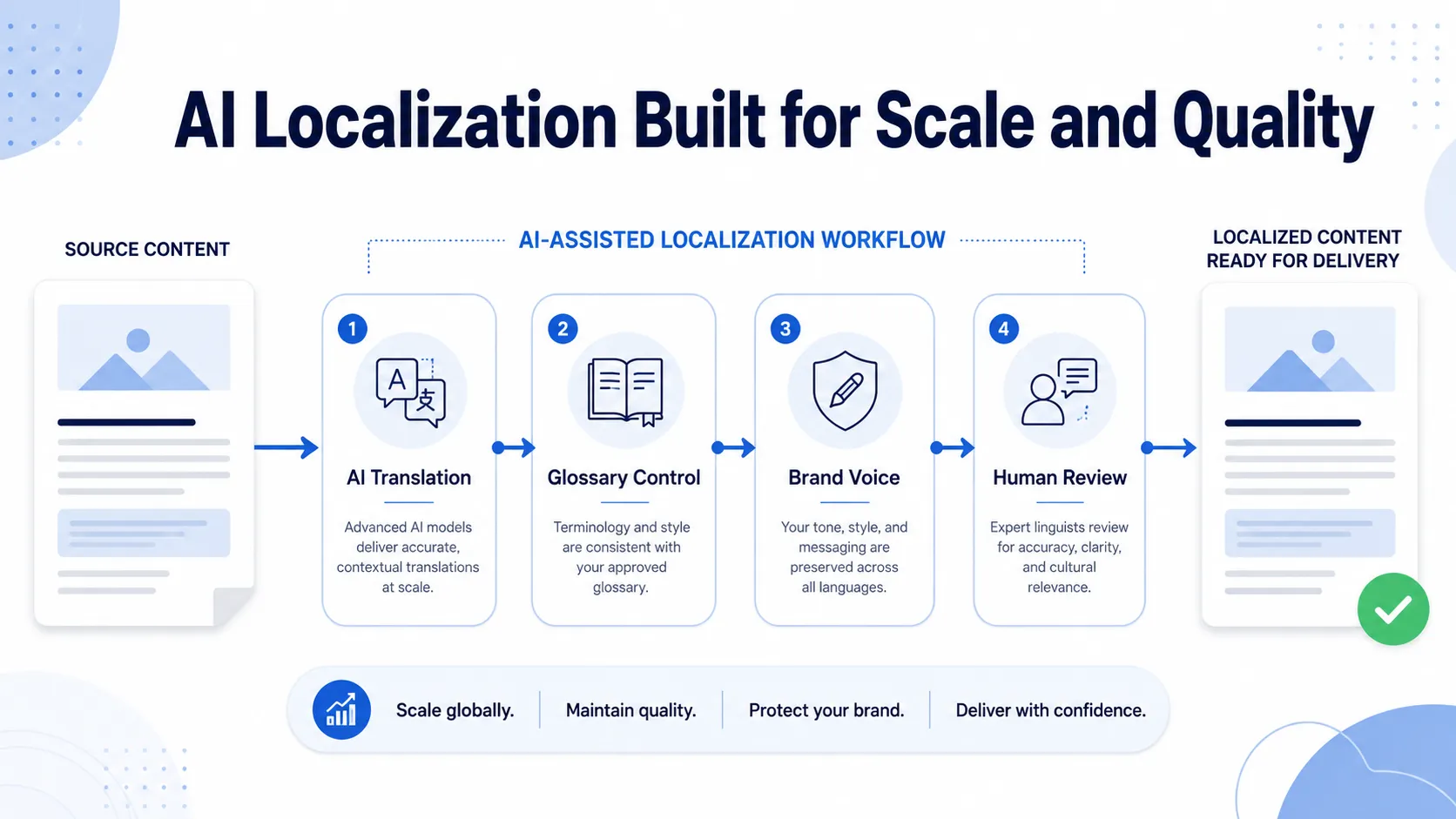



A website language selector is the UI element that lets users switch between the language versions of a multilingual website. Best practices include placing the selector in the header (top-right for LTR sites), labelling languages in their native scripts, avoiding flags as language indicators, persisting the user’s language choice across sessions, and pairing the selector with correct hreflang implementation so search engines serve the right language version to each user.
A language selector isn’t just a UI element. It’s the visible entry point to your entire localization infrastructure. A bad one sends users to the wrong language, breaks the first interaction, and undermines every dollar you spent on translation. A technically wrong one creates hreflang mismatches, geo-redirect loops, and indexing failures that hurt organic visibility in every target-language market.
If you’re building a multilingual site for Asia-Pacific markets, pair this guide with our deep-dive on APAC localization strategy and our reference on Traditional vs Simplified Chinese. For the language-quality side of the equation, see our honest assessment of Google Translate accuracy.
Language Selector UX Design: 10 Best Practices That Reduce Friction and Increase Language Version Usage
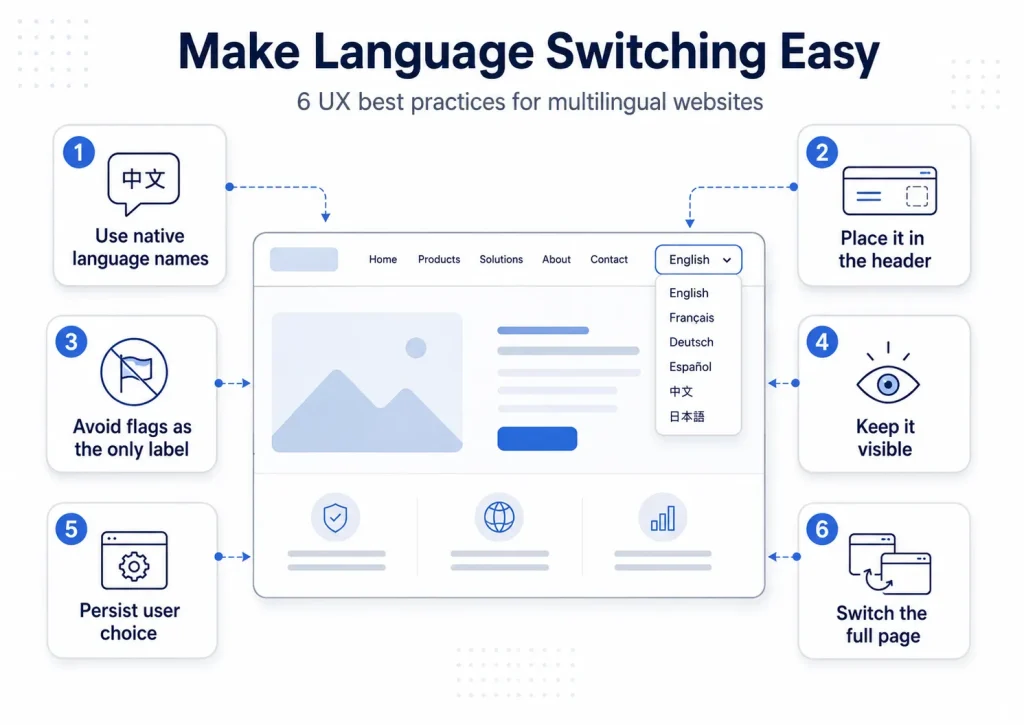
A language selector users don’t notice, can’t find, or find confusing kills the ROI of every translation behind it.
Here are the 10 best practices, and the anti-patterns that wreck them:
| Best Practice | Anti-Pattern to Avoid | Why It Matters | Evidence |
|---|---|---|---|
| Display language names in their native script | All languages labelled in English (“Spanish,” “French”) | A Spanish speaker on an English page may not recognise “Spanish” — but always recognises “Español” | NNGroup UX research |
| Show dual labelling: native + English | Native script only | Helps users unfamiliar with a script — “Español / Spanish,” “中文 / Chinese” | Simplelocalize.io guidance |
| Place in header, top-right (LTR sites) | Footer-only placement | Users look in the header first; footer is for low-priority content | NNGroup eCommerce research |
| Avoid flags as primary language indicators | Flags as the only label | Flags = countries, not languages; Spanish is spoken in 20+ countries | NNGroup, Simplelocalize, Fastly |
| Persist the user’s language choice across sessions | Resetting to default on every visit | Returning users shouldn’t have to re-pick their language every time | Core usability requirement |
| Switch the entire page, not just labels | Translating nav but leaving the body in English | Worse than no selector — sets expectations and breaks them | Core localisation rule |
| Keep the selector visible — never hidden in settings | Burying it in profile or preferences menus | Users in the wrong language can’t navigate to settings to fix it | Accessibility argument |
| Show full language name, not just ISO code | Displaying “EN” / “FR” / “DE” alone | ISO codes aren’t universally understood; “PT” is ambiguous (Brazil or Portugal) | Practical localisation guidance |
| Add search for sites with 10+ languages | Long alphabetical scroll-only dropdown | Search dramatically reduces time-to-target on large language sets | Smashing Magazine UX pattern |
| Apply correct lang=”” attribute to each language version | Missing or wrong HTML lang attribute | Screen readers use the wrong language; WCAG 2.1 Level A failure (3.1.1) | WCAG 2.1 compliance |
Where to Place the Language Selector
Place the language selector in the header, in the top-right area for left-to-right (LTR) sites. That’s where users look first.
Why top-right header is the standard
For LTR languages (English, French, German, Spanish, Polish, and so on), the top-right area of the header is where users expect to find a language selector. Nielsen Norman Group’s eCommerce research found this to be the most discoverable location. It’s also visible on every page without scrolling, doesn’t compete with the primary nav, and sits naturally alongside other site-wide controls like search, cart, and account.
RTL sites — flip the logic
For sites where Arabic, Hebrew, Persian (Farsi), or Urdu is the primary language, the visual logic flips. The “most important” position in RTL reading is top-right in the user’s reading direction, which is top-left in an LTR layout. Multilingual sites that serve both LTR and RTL audiences should test the position with real users from each.
Footer placement — secondary only
A footer language selector is fine as a backup. It shouldn’t be the only one. A user who lands on a page in the wrong language shouldn’t have to scroll to the bottom to switch.
Avoid these placements
- Account or preferences menus — users must change language before logging in
- First-visit pop-up only — a one-time prompt that disappears creates a frustration trap
- Hidden inside a hamburger menu on mobile — language belongs in the primary header, not buried
Mobile considerations
On mobile, the language selector belongs in the primary header — usually a globe icon with a short language code or native-script label. Aim for a tap depth of no more than 2 from any page to reach the language options.
Flags vs Text: Why the Flag Icon Language Selector Is a UX Anti-Pattern
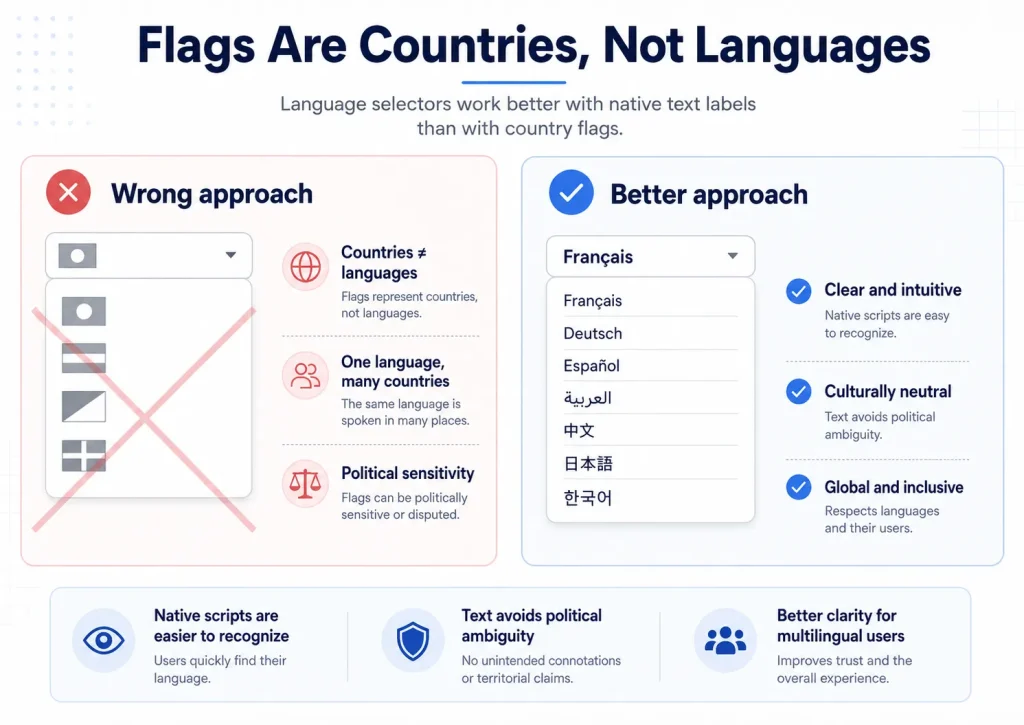
Use language names in their native scripts. Don’t use flags as the primary language indicator.
This is the most-cited mistake in language selector design — for 4 specific reasons.
1. Flags are countries, not languages
Spanish is spoken in Spain, Mexico, Argentina, Colombia, Chile, Peru, Venezuela, and 14 other countries. Which flag is “Spanish”? There’s no correct answer. The Spanish flag (Spain) ignores 470 million Spanish speakers from elsewhere. The Mexican flag alienates speakers from 20 other countries.
2. The same flag can mean multiple languages
Switzerland has 4 official languages (German, French, Italian, Romansh). Belgium has 3 (Dutch, French, German). Canada has 2 (English, French). A Swiss flag could mean any of 4 languages. The flag tells the user nothing about what language they’ll get.
3. Political sensitivity
Some flags carry political weight. The Taiwan flag is sensitive in Mainland China. Kosovo’s flag is unrecognised by several countries. Flags tied to disputed territories create avoidable political problems for a global website.
4. Flags can’t show dialect or regional variants
English (UK) vs English (US). Portuguese (Brazil) vs Portuguese (Portugal). Simplified Chinese vs Traditional Chinese. Flags can’t express these distinctions clearly.
The correct alternative — native script text
Use the language name in its own native script:
- French → Français
- German → Deutsch
- Spanish → Español
- Arabic → العربية
- Japanese → 日本語
- Chinese (Simplified) → 中文(简体)
- Chinese (Traditional) → 中文(繁體)
- Korean → 한국어
For extra recognisability, add the English name in parentheses: “Deutsch (German),” “Français (French).” This dual-labelling works regardless of which scripts the user reads.
Flags as a supplement (not the main label)
Flags work as a supporting visual cue alongside the text — particularly useful for distinguishing regional variants like English (UK) with the Union Jack vs English (US) with the Stars and Stripes. But flags shouldn’t be the only language indicator.
Language Selector Dropdown Patterns
Match the pattern to the number of languages you support. There’s no single “best” — it depends on how many you need.
Dropdown menu — the most common pattern, triggered by a globe icon or your current language label. Works well for 2–15 languages. Make tap targets at least 44×44px for WCAG 2.1. Build it on a <button> element (not a <div>) so it’s keyboard-navigable and screen-reader friendly via aria-expanded and aria-haspopup=”listbox”. Full HTML pattern coming up shortly.
Toggle — for sites with exactly 2 languages. A simple side-by-side pair like “EN | FR” or “English | Français” beats a dropdown. Both options always visible, no clicks needed.
Inline language list — for 20+ languages, put them on a dedicated page linked from the header. Beats endless scrolling. Trade-off: one extra page load.
Searchable picker — for 30+ languages, use a modal with a search field. Make sure it accepts both native script and Latin-alphabet input so users can find their language however they type.
Language Selector Technical Implementation: Hreflang, URL Architecture, Accept-Language, and Geo-Redirect
A language selector that looks right but is technically wrong creates indexing failures, redirect loops, and language detection errors that quietly break your multilingual SEO.
Here’s how to get the architecture right, starting with the URL structure under the selector:
| Architecture | URL Pattern | Example | When to Use | SEO Strength |
|---|---|---|---|---|
| ccTLD (country-code TLD) | Separate domain per country | example.fr / example.de / example.co.uk | Large brands with country-specific operations; max geo-targeting | Strongest |
| Subdomain | Language / country subdomain | fr.example.com / de.example.com | Mid-size operations; good balance of independence and shared management | Moderate |
| Subdirectory (recommended) | Language / country path | example.com/fr/ / example.com/de/ | Most B2B and eCommerce sites; Google’s recommended approach | Strong |
| Query parameter (avoid) | Language as URL parameter | example.com?lang=fr | Avoid for new builds; legacy systems only | Weakest |
Hreflang Implementation for Language Selectors: The Complete Reference
Hreflang is the technical signal that tells search engines which language version of a page to serve to users in different language and region contexts. Without correct hreflang, Google may serve the wrong language version of your pages. Even if the right one exists.
What hreflang actually does
Hreflang attributes (or the equivalent XML sitemap or HTTP header) tell Google: “This page at URL X in language Y is the equivalent of the page at URL Z in language W.” Per Google Search Central documentation, Google uses this to:
- Serve the correct language version to users in different language and region contexts
- Recognise that language versions are intentional duplicates, not unintentional duplicate content
- Attribute SEO signals (backlinks, authority) correctly across language versions
Hreflang syntax
Add these in the <head> section of every language version:
<link rel=”alternate” hreflang=”en” href=”https://www.example.com/page/” />
<link rel=”alternate” hreflang=”fr” href=”https://www.example.com/fr/page/” />
<link rel=”alternate” hreflang=”de” href=”https://www.example.com/de/page/” />
<link rel=”alternate” hreflang=”zh-CN” href=”https://www.example.com/zh-cn/page/” />
<link rel=”alternate” hreflang=”zh-TW” href=”https://www.example.com/zh-tw/page/” />
<link rel=”alternate” hreflang=”x-default” href=”https://www.example.com/page/” />
The
hreflang=”x-default” tag identifies the fallback page shown when no other language matches the user’s preferences — usually the English default or a language selector landing page.
Language codes for hreflang (BCP 47 format)
Hreflang uses ISO 639-1 language codes (2 letters), with optional ISO 3166-1 country codes:
| Language / Region | hreflang Value | Notes |
|---|---|---|
| English (generic) | en | Use when no specific region targeting |
| English (UK) | en-GB | British English content |
| English (US) | en-US | American English content |
| French (France) | fr or fr-FR | Default French; FR for region-specific |
| French (Canada) | fr-CA | Canadian French — different vocabulary and conventions |
| Spanish (Spain) | es or es-ES | Default Spanish for Spain |
| Spanish (Mexico) | es-MX | Latin American Spanish reference market |
| Chinese (Simplified) | zh-CN | NOT zh-Hans — Google doesn’t support script subtags |
| Chinese (Traditional / Taiwan) | zh-TW | NOT zh-Hant |
| Chinese (Traditional / HK) | zh-HK | Different from zh-TW — HK-specific vocabulary |
| Portuguese (Brazil) | pt-BR | Brazilian Portuguese |
| Portuguese (Portugal) | pt-PT or pt | European Portuguese |
The 5 most common hreflang errors
1. Missing return links — every hreflang relationship must be bidirectional. If page A declares page B as an alternate, page B must declare page A back. One-way hreflang is ignored by Google.
2. Missing x-default — without hreflang=”x-default”, Google has no fallback for users whose language doesn’t match any of your declared versions.
3. Wrong language codes — using hreflang=”zh” alone (ambiguous — doesn’t say Simplified or Traditional), or using zh-Hans / zh-Hant (script subtags Google doesn’t support) instead of zh-CN / zh-TW. See our complete Traditional vs Simplified Chinese guide for the full locale code reference.
4. Pointing to non-canonical URLs — if a language version has a canonical tag pointing somewhere else, your hreflang should point to the canonical URL, not the original.
5. Language and region mismatch — hreflang=”fr-DE” (French content for Germany) is technically valid but unusual. Make sure unusual combinations are intentional.
Accept-Language Header vs IP Geolocation: Which Signal to Use for Language Detection
Use the Accept-Language header for language detection. Don’t use IP geolocation as the primary signal. This is the #1 mistake Fastly identifies in their analysis of language switcher failures.
Why Accept-Language is the right primary signal
The Accept-Language HTTP header is sent by every browser with every request. It contains the user’s device language preferences in BCP 47 format, in priority order. For example:
Accept-Language: fr-FR,fr;q=0.9,en-US;q=0.8,en;q=0.7
This says: French (France) is the primary preference, French (any) is second, English (US) third, English (any) fourth. This is a direct signal from the user’s device — almost always more accurate than IP geolocation.
Why IP geolocation breaks language detection
- A German business traveller in Japan has a Japanese IP but wants German content
- A Japanese student living in Germany has a German IP but wants Japanese content
- A remote worker on a VPN appears in a different country entirely
- A multilingual user with English on their phone and Arabic on their laptop has different preferences per device
What IP geolocation IS good for
Use IP for region-based features, not language assignment:
- Showing local currency and pricing
- Pre-selecting a region for shipping calculations
- Surfacing local stores, offices, or support contacts
It’s fine to use IP to suggest a language version (“Are you looking for our French site?”) — but the user must always be able to override the suggestion.
The correct combined approach
- Read the Accept-Language header on page load
- If a matching language version exists, serve it (or offer it prominently)
- If no match, fall back to x-default (English or a language selector page)
- Let the user override at any time via the language selector
- Store the user’s explicit choice in a cookie / localStorage; respect it on every future visit, overriding Accept-Language for returning users
Geo-redirect rules
If you implement geo-redirection (auto-redirecting users to a language version based on location), follow these rules:
- Never trap users. Every redirected page needs a visible escape route to their preferred language
- Never redirect users who already made an explicit language choice
- Test geo-redirect from multiple locations using a VPN before launch. Redirect loops are common and catastrophic
Language Preference Persistence: Cookies, localStorage, and How to Stop Annoying Returning Users
Store the user’s explicit language choice in a persistent cookie. When they come back, read the cookie before deciding what language to serve.
Without persistence, the most common returning-user complaint is real: “I switched to French. I came back today. I’m back on the English site.” That’s the friction you eliminate by storing the preference.
Three persistence options
- Session cookie — stores the choice for the current browser session, expires on close. Prevents reset within a session, but doesn’t help returning users.
- Persistent cookie (recommended) — stores the choice for a long expiry (e.g. 12 months). Read on every page load. Standard approach for most multilingual websites.
- localStorage — browser-side storage that persists until cleared. Works for client-side language switching, but a server can’t read localStorage before the first response — so for server-side detection, cookies are better.
Language detection priority order
When deciding which language to serve, check signals in this order:
- User’s explicit stored preference (persistent cookie) — highest priority; overrides everything
- URL-based language — if the user navigated directly to /fr/page, serve French regardless
- Accept-Language header — for new users with no stored preference and no language-specific URL
- IP geolocation — lowest priority; use only for regional suggestions, never forced language assignment
- Site default — x-default fallback when no other signal matches
GDPR note on language preference cookies
A language preference cookie stores a functional value. The user’s chosen language. Under GDPR, functional cookies necessary for the basic operation of the website (including delivering content in the user’s preferred language) are generally classified as strictly necessary or functional cookies, exempt from explicit consent under GDPR Recital 47 and the ePrivacy Directive’s functional cookie exemption. Implementation may vary based on local Data Protection Authority guidance, check your jurisdiction.
Language Selector Implementation in WordPress, Shopify, Webflow, and Other CMS Platforms
Most B2B websites run on a CMS that handles multilingual structure differently. Understanding how each platform implements language selectors prevents the most common configuration errors.
Here’s how the major platforms compare:
| Platform | Multilingual Approach | Language Selector | Hreflang Support | Best For |
|---|---|---|---|---|
| WordPress + WPML | Plugin-based; subdirectory or subdomain URLs; each language is a separate post / page set | WPML widget / shortcode; flags, text, or both | Auto-generated; configuration review needed | Full-featured WP multilingual |
| WordPress + Polylang | Lighter alternative to WPML; free core; paid pro extensions | Polylang switcher widget; similar customisation | Polylang Pro generates hreflang; free version needs manual work | Smaller WP multilingual sites |
| Shopify (Markets) | Shopify Markets native multilingual; URL: example.com/fr, example.com/de | Native theme-integrated selector; apps like Langify, Translate & Adapt | Auto-generated for Markets-enabled stores | eCommerce with Shopify Markets |
| Webflow | Native Webflow Localization (launched 2023); subdirectory URLs | Built-in language selector component | Auto-generated by Webflow Localization | Modern Webflow sites |
| Contentful / Headless CMS | API-driven; locale management in content model; URLs handled in frontend | Implemented in frontend code; full flexibility | Frontend developer responsibility | Custom builds, max flexibility |
| HubSpot | HubSpot multilingual content (multi-language groups); subdirectory URLs | HubSpot language switcher module | Auto-generated for multi-language page groups | Pro / Enterprise plans only |
The Language Selector and Translation Quality: Why the Selector Is Only Half the Solution
A technically perfect language selector that points to badly translated content is worse than no selector at all. The selector amplifies whatever’s behind it.
The selector is an amplifier
If your French version is machine-translated without professional post-editing — generic vocabulary, wrong register, no cultural fit — the language selector is an efficient channel for distributing brand-damaging content. The selector makes it easy to find. The content makes it costly to have.
What professional translation behind the selector delivers
- Conversion — professional translation in the right register and vocabulary outperforms raw MT for conversion rates. A well-translated French website converts French-speaking visitors at rates close to your English site’s conversion rate.
- SEO — search engines rank language versions only when the content uses the vocabulary native speakers actually search for. Professionally translated content with target-language keyword research outranks machine-translated content in local search.
- Trust — native readers spot “sounds translated” content within a sentence or two. Professional translation that reads like it was written in the target language builds trust. Machine translation erodes it.
- Compliance — some markets require plain-language content in the local language for regulated content (GDPR, EU FIC, CE marking). MT output often fails plain-language standards even when the meaning is technically right.
The full multilingual website workflow
- Decide language strategy and URL architecture
- Implement the language selector (correct hreflang, Accept-Language, persistence)
- Commission professional translation for core pages (human translation + SEO keyword research + style guide)
- Commission MTPE for high-volume functional content (product descriptions, FAQ, help)
- Deploy translated content behind the language selector
- Audit hreflang in Google Search Console after launch
Language Selector Pre-Launch Checklist: 15 Points to Audit Before Going Live
Use this 15-point checklist to verify your language selector is correct across UX, technical, and content dimensions before deployment.
7 UX checklist
☐ Language selector is visible in the header on all pages (not footer-only)
☐ Languages are labelled in their native scripts (Español, Deutsch, Français, 日本語)
☐ No flags used as the sole language indicator
☐ Current active language is visibly marked (aria-selected or visual highlight)
☐ Selector is keyboard-accessible (Tab, Enter, Space, arrow keys)
☐ Mobile: language selector is reachable in 2 taps or fewer from any page
☐ Selecting a language takes the user to the equivalent page in the new language — not back to the homepage
8 Technical checklist
☐ Hreflang tags implemented on every page in every language version (in <head>, XML sitemap, or HTTP header)
☐ Every hreflang relationship is bidirectional (every version references all the others)
☐ hreflang=”x-default” is included pointing to the fallback / default page
☐ Language codes use correct BCP 47 format (zh-CN / zh-TW / zh-HK — not zh-Hans / zh-Hant)
☐ HTML lang attribute is correct on each page’s <html> element
☐ User language preference is persisted in a cookie on explicit selection; cookie respected on return
☐ Accept-Language header is the primary detection signal (not IP geolocation)
☐ Geo-redirect (if used): tested from multiple locations; no redirect loops; visible escape route on every redirected page
3 Content checklist
☐ All language versions have professional translation — not raw machine translation
☐ Target-language SEO keyword research has been done for each language version
☐ Hreflang verified in Google Search Console after deployment (no errors reported)
Build the Translation Content That Makes Your Language Selector Worth Having
A language selector is the entry point to your multilingual site. The translation behind it decides whether that entry point leads to a brand asset or a liability.
Circle Translations provides professional website translation that turns a technically correct language selector into a commercially effective multilingual presence. Native translators, target-language SEO keyword research, ISO 17100 two-stage workflow, and hreflang-ready delivery in your CMS format. Simplified Chinese and Traditional Chinese as separate localizations, never auto-converted. APAC language pairs (Japanese, Korean, Bahasa Indonesia, Vietnamese, Thai), MTPE for high-volume content, NDA before file transfer.
Tell us your target languages, page count, CMS platform, and launch timeline — we’ll scope your website translation programme and send a quote within 1 business hour.
Get a Website Translation Quote → View Translation and Localisation Services → View Multilingual Website Best Practices →
Frequently Asked Questions
Where should the language selector be placed on a website?
Place the language selector in the header, in the top-right area for left-to-right (LTR) sites. This is where users expect to find it. Nielsen Norman Group eCommerce research confirms top-right header placement has the highest user discovery rate. A footer language selector is acceptable as a secondary location, but it shouldn’t be the only one.
Should a language selector use flags or text?
Use text in native scripts as the primary language indicator. Don’t use flags as the only label. Flags represent countries, not languages. Spanish is spoken in 20+ countries, Arabic in 22+ countries, and a single flag can’t represent a multi-country language.
What is hreflang, and why does a language selector need it?
Hreflang is an HTML attribute (with XML sitemap and HTTP header equivalents) that tells search engines which language and region version of a page to serve to users in different language contexts. Without hreflang, Google may serve the wrong language version of your pages in search results.
How do I remember a user’s language preference across visits?
Store the user’s explicit choice in a persistent cookie (recommended) or localStorage. Read the cookie on every visit before making language decisions.
When a user picks a language via the selector, write their choice to a cookie with a long expiry (around 12 months). On future visits, read this cookie before making language decisions. The stored preference should override the Accept-Language header for returning users. This stops the most common returning-user complaint: switching to your preferred language, then finding the site back on the default the next day.
Can I use IP geolocation to automatically redirect users to their language version?
Yes. IP geolocation can suggest a language version, but it shouldn’t force-redirect users without giving them a way to override it.
The core problem is a user’s IP shows current location, not language preference. Business travellers, expats, VPN users, and multilingual users all have IP addresses that don’t match their preferred language.
Does a language selector affect SEO?
Yes. Both positively and negatively, depending on implementation.
A correctly implemented language selector with hreflang tags and proper URL architecture lets Google index and rank separate language versions in their respective markets, significant organic SEO value in each target language.
What is the difference between a language selector and a locale selector?
A language selector lets users pick a language. A locale selector lets users pick a specific language-region combination.
Examples of locale pairs include English (US) vs English (UK), French (France) vs French (Canada), Spanish (Spain) vs Spanish (Mexico), and Portuguese (Portugal) vs Portuguese (Brazil). For most B2B websites with limited language coverage, a language selector is enough. For global eCommerce or SaaS where regional variants affect pricing, date formats, currency, regulatory content, or vocabulary, a locale selector, or a 2-step language + region selector, is more appropriate.