The best translation API depends on language coverage, output quality, pricing, and integration requirements. Google Cloud Translation API offers the widest language coverage (135+ languages) and strong scalability.
DeepL API delivers the highest-quality output for European language pairs. Azure Translator and Amazon Translate integrate tightly with Azure and AWS ecosystems.
All major APIs produce machine translation output that is useful for high-volume automated workflows, but raw API output is rarely publication-ready for customer-facing, legal, or brand-sensitive content. These cases require machine translation post-editing (MTPE), terminology control, or domain-adapted models.
For engineering and localisation teams, the decision is not just which translation API to use, but where human quality control enters the workflow. This guide compares the major APIs, explains pricing and architecture, and shows when to add post-editing and corpus-based quality improvements.
How Translation APIs Work: Architecture, Request Flow, and What Happens Before the Text Is Returned
Before choosing a translation API, it helps to understand what the API actually does inside the request pipeline. Translation APIs convert source text into another language using neural models, but they do not manage terminology consistency, workflow, or human quality control.
As Philipp Koehn (2020) explains in Neural Machine Translation, “Neural machine translation systems automatically learn to map sentences from a source language to a target language using neural network models trained on large parallel corpora,” highlighting that the core function of these systems is language conversion rather than broader translation management tasks such as terminology governance or quality assurance.
Neural Machine Translation vs Rule-Based and Statistical MT: What Modern APIs Actually Use
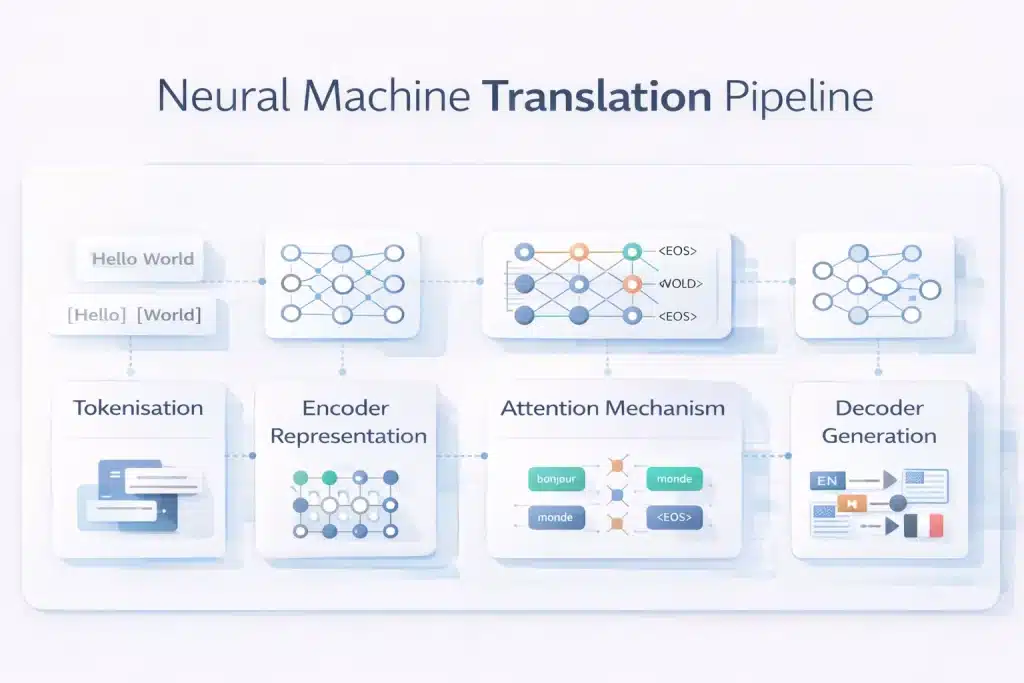
All major translation APIs, Google Cloud Translation, DeepL, Microsoft Azure Translator, Amazon Translate, and ModernMT, use neural machine translation (NMT) built on transformer architectures. These models process text as sequences of tokens and generate translations based on probability patterns learned from large bilingual datasets.
The pipeline typically follows five steps. First, the input text is tokenised into subword units. Second, the encoder builds a contextual representation of the entire sentence.
Third, the attention mechanism identifies relationships between words across the sentence. Fourth, the decoder generates the most probable sequence in the target language. Finally, post-processing reconstructs readable text from tokens.
NMT performs well for common language pairs and general web content but struggles with terminology consistency, specialised domains, low-resource languages, and culturally nuanced marketing content.
Translation API Request Structure: Endpoints, Authentication, Character Limits, and Rate Limits
Most translation APIs use a REST request pattern with authentication, an endpoint, and a JSON payload containing the text to translate. Authentication typically uses an API key or OAuth token, generated in the provider’s cloud console and sent in the request header.
Example request body structure:
{
“q”: “source text”,
“source”: “en”,
“target”: “fr”
}
Optional parameters include HTML handling, glossary configuration, and formality settings.
Pricing is almost always character-based, meaning the number of source characters translated determines cost. Rate limits vary by provider, but free tiers usually allow hundreds of requests per minute and around 1–2 million characters per month, while paid tiers scale to very large volumes or batch translation jobs.
Translation API vs LLM Translation vs TMS: Three Different Approaches and When Each Applies
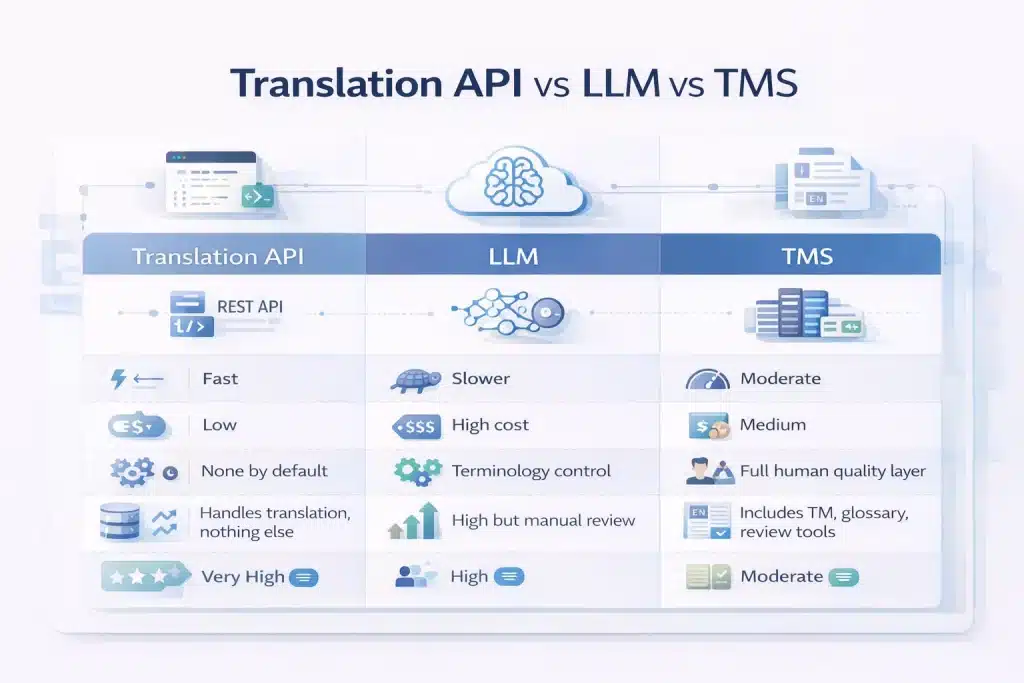
Engineering teams evaluating translation infrastructure usually encounter three different approaches.
A translation API (Google, DeepL, Azure, Amazon) provides fast neural machine translation through a REST endpoint. Output is returned in milliseconds and priced per character. This approach works best for high-volume automated translation, such as interface strings, user-generated content, or chat messages.
LLM translation uses general-purpose models such as GPT, Claude, or Gemini. These systems often produce higher-quality translations for nuanced content but are slower and more expensive, making them less suitable for large-scale pipelines.
A translation management system (TMS) combines MT engines with workflow tools such as translation memory, terminology glossaries, and human review stages. This model suits organisations managing ongoing localisation workflows with quality requirements.
A raw translation API only performs the translation step. It does not enforce terminology, track previous translations, or manage human review, which is why many production pipelines add a post-editing or terminology layer on top.
5 Best Translation APIs Compared: Google, DeepL, Azure, Amazon, and ModernMT
Five translation APIs dominate production localisation pipelines. Each differs in language coverage, translation quality, pricing, and ecosystem integration, which determines the best choice for a specific engineering or content workflow.
| API | Languages | Free tier | Paid pricing | Best quality for | Weaknesses | Best for |
| Google Cloud Translation v2 Basic | 135+ | 500K chars/month | $20/1M chars | Wide language coverage | Lower fluency than DeepL for EU languages | High-volume multilingual pipelines |
| Google Cloud Translation v3 Advanced | 135+ | 500K chars/month | $20–$80/1M chars | Custom domain models | More complex setup | Enterprises needing domain adaptation |
| DeepL API Free | 29 | 500K chars/month | — | European languages | Limited language coverage | EU language quality |
| DeepL API Pro | 29 | None | ~$25/1M chars | High fluency + glossary control | Higher cost; limited languages | Marketing and content translation |
| Azure Translator | 100+ | 2M chars/month | $10/1M chars | Azure ecosystem integration | Slightly lower EU language quality | Azure-native systems |
| Amazon Translate | 75 | 2M chars/month (12 months) | $15/1M chars | AWS ecosystem integration | Smaller language coverage | AWS workflows |
| ModernMT | 200+ | Usage-based | ~$20/1M chars | Adaptive MT from translation memory | Requires TM integration | MT + post-editing pipelines |
| LibreTranslate | 50+ | Self-hosted | $9+/month hosted | Open-source privacy | Lower output quality | On-premise or private deployments |
Google Cloud Translation API: v2 Basic vs v3 Advanced — Features, Pricing, and Custom Model Capability
Google Cloud Translation API is the most widely used translation API because of its 135+ language coverage, scalable infrastructure, and predictable pricing.
The API has two main versions. v2 Basic is simpler and uses an API key, making it easy to integrate for high-volume translation. v3 Advanced adds enterprise features such as batch translation, document translation, custom terminology glossaries, and domain-adapted models via AutoML.
Pricing for standard neural translation is $20 per million characters, with 500,000 characters free each month. Custom models trained with AutoML cost around $80 per million characters.
Quality is strong for common language pairs and especially reliable for low-resource languages where DeepL lacks coverage, though DeepL still leads in fluency for major European languages.
DeepL API: Quality Benchmark Leader for European Languages, Formality Control, and Custom Glossaries
DeepL API is widely considered the quality benchmark for European language translation, consistently outperforming other MT engines for language pairs such as EN-DE, EN-FR, EN-ES, and EN-IT.
The API offers a Free plan (500K characters/month) and a Pro plan with usage-based pricing around $25 per million characters. The Pro plan also guarantees that submitted data is not used for model training.
DeepL’s distinctive features include formality control, which allows developers to choose between formal and informal tone, and custom glossaries, which enforce consistent terminology across all translations.
The main limitation is language coverage. With roughly 29 supported languages, DeepL often needs to be combined with Google or Azure when translating lower-resource language pairs.
Microsoft Azure Cognitive Services Translator: Enterprise Integration, Custom Translator, and Pricing
Azure Translator is a strong option for organisations already using the Microsoft Azure ecosystem. It integrates directly with Azure services such as Logic Apps, Power Automate, Functions, and Microsoft 365, simplifying deployment in enterprise environments.
The service supports 100+ languages and provides the most generous free tier among major APIs, 2 million characters per month. Standard pricing is approximately $10 per million characters, making it one of the lowest-cost commercial options.
Azure also provides Custom Translator, allowing organisations to train domain-specific models using parallel corpora. While translation quality is comparable to Google for most language pairs, DeepL still performs better for many European languages.
Amazon Translate and ModernMT: AWS-Native Workflows and Adaptive MT for TM-Driven Pipelines
Amazon Translate and ModernMT address more specialised translation workflows.
Amazon Translate integrates deeply with the AWS ecosystem, connecting easily with services such as S3, Lambda, DynamoDB, and AWS Connect.
Pricing is around $15 per million characters, and new AWS accounts receive a 2-million-character monthly free tier for the first year. Its Active Custom Translation feature improves output using uploaded parallel data.
ModernMT focuses on adaptive machine translation. The system learns continuously from translation memory corrections, meaning each reviewed translation improves future output. This makes ModernMT particularly useful in long-term MT + post-editing workflows where quality improves over time.
Free Translation APIs: LibreTranslate, Argos, and the Real Cost of “Free”
Several free or open-source translation APIs exist, but they come with practical limitations.
LibreTranslate is an open-source neural MT API that can be self-hosted, providing complete control over data privacy. However, running it in production requires server infrastructure, GPU resources, and ongoing maintenance, and translation quality is significantly lower than commercial engines.
Argos Translate provides fully offline translation through a Python library, but quality and language coverage are limited.
Even when API usage is technically free, the real cost often appears in post-editing time. Lower-quality MT output can require substantial human correction, meaning the operational cost of editing often exceeds the savings from using a free translation engine.
Translation API Quality Risks: Where Machine Translation Fails and Why Raw Output Is Rarely Publication-Ready
Even the best translation APIs, including DeepL Pro and Google Cloud Translation, produce draft-quality output. For most B2B content, raw machine translation still requires terminology control, quality checks, or human post-editing before publication.
Terminology Inconsistency: The Quality Risk That Compounds at Scale
Terminology inconsistency is the most common quality failure in translation API workflows. Neural MT systems process each request independently, so the same source term may be translated differently across pages or documents.
For example, a product name or technical term might appear with multiple translations across a website, help centre, and documentation set. This creates an inconsistent user experience and undermines localisation quality.
The problem grows quickly at scale. Even a small inconsistency rate across thousands of strings produces hundreds of conflicting terms. The practical solution is terminology control — enforcing approved translations through API glossaries or upstream terminology databases.
Domain-Specific Quality Failures: Legal, Medical, Technical, and Marketing Content
Machine translation quality varies heavily by content domain. General informational content often translates reasonably well, while specialised or persuasive content requires human review.
General web content and product descriptions typically need light post-editing. Software interface strings usually require review because short strings lack context. Technical documentation often performs moderately well but benefits from terminology control.
Legal, medical, and financial content require full post-editing due to strict terminology requirements and regulatory implications. Marketing copy presents a different challenge: MT translates words but not persuasive intent, so transcreation is often required rather than simple post-editing.
The key operational decision is determining which content types can use raw MT and which require human review.
BLEU Scores, TER, and Human Evaluation: How to Measure Translation API Quality
Translation quality should be evaluated using measurable metrics rather than vendor claims.
BLEU (Bilingual Evaluation Understudy) compares machine translation output to a human reference translation and produces a score from 0–100. While widely used, BLEU measures wording similarity rather than meaning accuracy.
TER (Translation Error Rate) measures how many edits a human editor must make to produce a publishable translation. Lower TER directly correlates with lower post-editing effort and cost.
MQM (Multidimensional Quality Metrics) is the most detailed evaluation framework. It classifies translation errors by category — accuracy, fluency, terminology, and style — providing actionable quality data.
A practical evaluation approach is to test representative content across several APIs, score the results using MQM, and calculate API cost plus post-editing time. This reveals the true production cost and quality level for each translation engine.
Machine Translation Post-Editing (MTPE): When to Add a Human Quality Layer to API Output
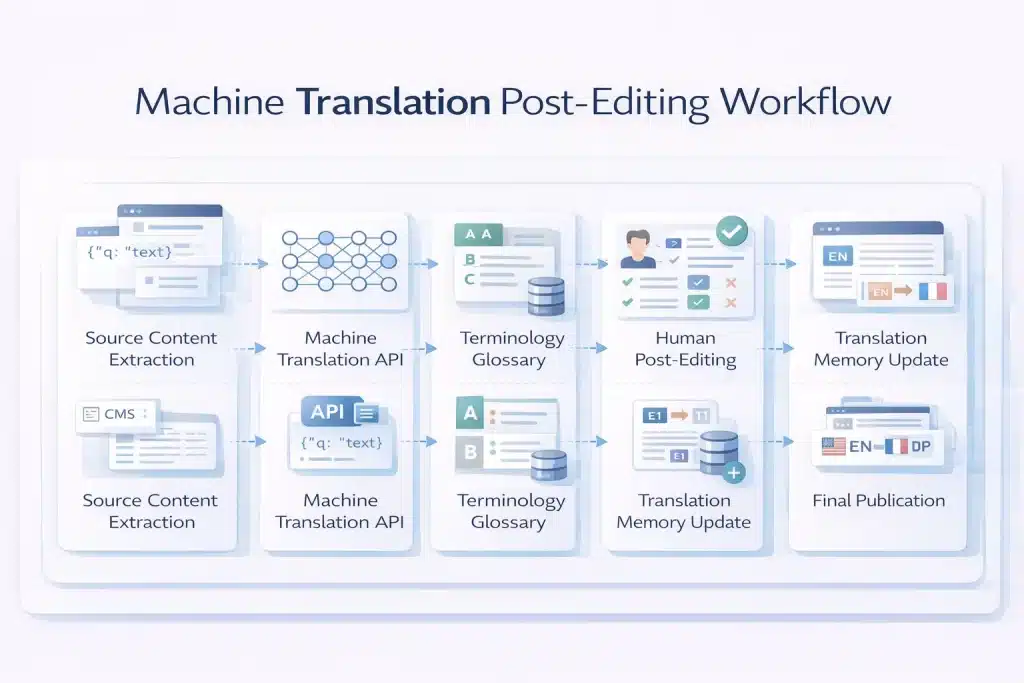
Machine translation APIs deliver speed and scale, but most business content still requires review. Machine Translation Post-Editing (MTPE) adds a human quality layer that corrects errors, enforces terminology, and ensures translations meet publication standards.
Light Post-Editing vs Full Post-Editing: Defining the Two Levels and Their Cost and Quality Trade-offs
Post-editing exists in two main levels. Light post-editing focuses on fixing errors that affect meaning or clarity. Editors correct major mistranslations, terminology mistakes, and serious grammar issues, but stylistic imperfections remain.
The result is understandable content suitable for internal communication, knowledge bases, or support workflows. It is fast (about 1,500–3,000 words/hour) and costs roughly 30–50% of full human translation.
Full post-editing corrects all issues, accuracy, terminology, fluency, tone, and cultural appropriateness, producing output equivalent to professional human translation. It is used for customer-facing content, marketing, legal material, and regulated industries. Speed averages 700–1,200 words/hour, with cost typically 50–70% of full human translation.
Corpus Translation and Terminology Control: How a Parallel Corpus Improves Translation API Output
The most effective way to improve translation API output is by providing domain-specific training data. This usually takes the form of a parallel corpus, source texts paired with validated translations.
These datasets allow APIs to produce more consistent and domain-appropriate translations. Custom model training features such as Google AutoML Translation, Azure Custom Translator, and Amazon Active Custom Translation use this data to adapt base MT models to an organisation’s terminology and writing style.
Even without custom models, uploading terminology glossaries ensures consistent translation of product names, technical terms, and brand language. For organisations without existing data, building a parallel corpus through professional translation creates the foundation for future automation and lower MTPE costs.
Building a Translation API + MTPE Workflow: Architecture, Triggers, and Quality Gates for B2B Content Operations
A production translation pipeline typically combines automation with structured quality controls.
The workflow starts with content extraction and preprocessing, where source text is pulled from a CMS or product system and prepared for translation. Translation memory is checked first, so previously translated segments are reused, reducing API usage.
Next, the translation API processes new text, applying glossary parameters and formatting rules. The output is stored and prepared for review.
A quality gate then determines whether post-editing is required. Internal or low-risk content may be published directly from machine output, while marketing, product pages, or regulated content are routed to post-editors.
Post-editors review translations in a CAT tool, correct errors, and store approved segments in translation memory. The final content is then returned to the CMS and published, ensuring quality improves over time as the translation memory grows.
How to Choose the Right Translation API: A Decision Framework for Engineering and Localisation Teams
Choosing a translation API depends on language coverage, quality requirements, infrastructure, and cost constraints. A SaaS product translating UI strings has very different needs from a localisation team managing high-stakes legal or marketing content.
| Use case | Recommended API | Why |
| High-volume, wide language coverage | Google Cloud Translation v2 | 135+ languages, scalable, cost-efficient |
| European language quality-first | DeepL API Pro | Highest fluency for EN↔DE/FR/ES/IT/PT/NL/PL |
| Azure ecosystem integration | Azure Cognitive Services Translator | Native integration with Microsoft tools |
| AWS ecosystem integration | Amazon Translate | Built for AWS pipelines and services |
| TM-driven adaptive workflows | ModernMT | Learns from translation memory feedback |
| Domain-adapted custom models | Google v3 AutoML / Azure Custom Translator | Fine-tuned models using a parallel corpus |
| Privacy-sensitive deployments | LibreTranslate (self-hosted) | On-premise, no cloud data transfer |
| LLM-quality translation | GPT-4o / Claude API | Higher quality for nuanced content |
Translation API Pricing Comparison: How to Calculate True Cost Per Word Across Providers
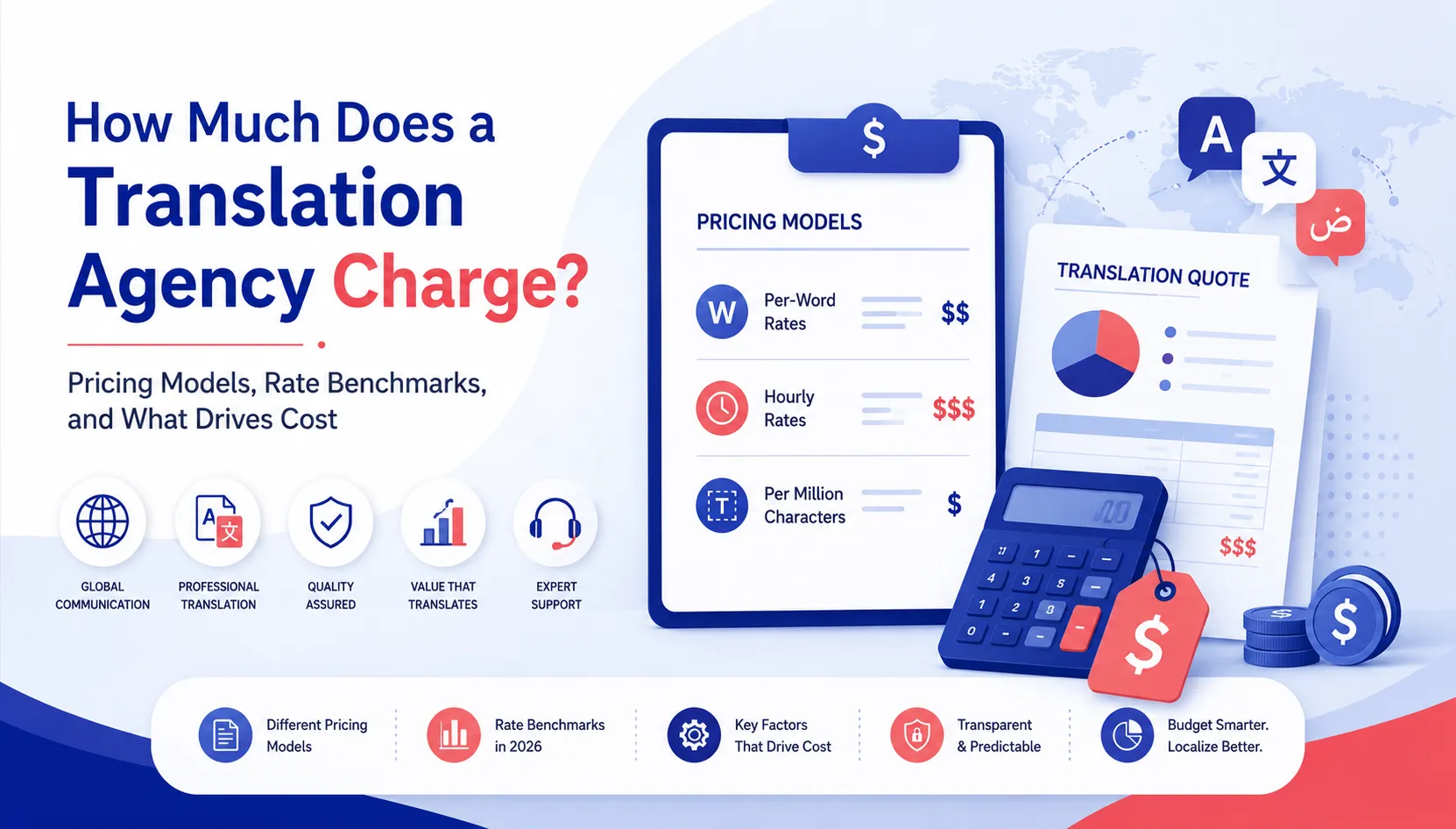
Translation APIs charge per character, not per word. For English, the average is about 5.5 characters per word, meaning 1 million characters equals roughly 181,000 words.
| Provider | Free tier | Standard pricing | Notes |
| Google v2 | 500K chars/month | $20/1M chars | Scales well for large volumes |
| Google v3 AutoML | 500K chars/month | $80/1M chars | Custom domain models |
| DeepL Free | 500K chars/month | — | Data may be used for training |
| DeepL Pro | None | ~$25/1M chars | Glossary support, higher quality |
| Azure Translator | 2M chars/month | $10/1M chars | Lowest commercial pricing |
| Amazon Translate | 2M chars/month (12 months) | $15/1M chars | AWS-native workflows |
| ModernMT | Usage-based | ~$20/1M chars | Adaptive MT with TM feedback |
The estimated MT-only cost per 1,000 words ranges from $0.05–$0.14 depending on the provider. When post-editing is added, total translation cost typically falls between $7–$18 per 1,000 words, compared with $20–$30 per 1,000 words for full human translation.
Transliteration API vs Translation API: When Converting Script Is the Right Operation
Translation and transliteration perform different tasks.
Translation converts meaning between languages.
Example: “Hello” → “Bonjour”.
Transliteration converts text between writing systems while keeping the same language.
Example: “नमस्ते” → “Namaste”.
Transliteration is useful when systems must process names, addresses, or content written in non-Latin scripts. Typical use cases include international database normalisation, search indexing, pronunciation guides, and product name romanisation.
API support varies. Azure Translator offers a dedicated transliteration endpoint, while Google Cloud Translation v3 provides limited romanisation features. DeepL currently does not include native transliteration support.
Add the Quality Layer Your Translation API Needs — MTPE and Corpus Translation Services
Translation APIs deliver scale. Circle Translations adds the quality layer.
We integrate directly with your translation API workflow to provide post-editing, terminology control, and domain-adapted training data.
Every MTPE engagement includes:
✓ Content-type quality tier classification (light vs full post-editing)
✓ Professional domain-specialist post-editors
✓ Terminology glossary creation for DeepL, Google v3, or Azure APIs
✓ Translation memory (TM) built from reviewed segments
✓ MQM-based quality scoring
✓ Parallel corpus creation for custom model training
✓ Delivery in XLIFF, TMX, DOCX, SRT, or direct CMS/TMS integration
Looking Beyond APIs? Get Human-Quality Translation at Scale.
Circle Translations combines expert linguists with cutting-edge technology — offering MT post-editing, corpus translation, and more across 100+ languages for teams that need precision, not just speed.
Frequently Asked Questions – Best Translation API
Can I use the Google Translate API for free in production?
Yes, within limits. Google Cloud Translation API includes a free tier of 500,000 characters per month. If usage stays below this threshold, no charges apply. Once exceeded, pricing starts at $20 per million characters. Billing must be enabled in Google Cloud Console to continue using the API beyond the free tier.
Is DeepL API better than Google Translate API for professional content?
Often, yes, for European languages. DeepL typically produces more fluent translations for EN↔DE, EN↔FR, EN↔ES, and similar pairs. However, Google supports far more languages (135+), making it the better choice for global multilingual workflows.
How do I get a Google Translate API key?
Create one in Google Cloud Console. Enable the Cloud Translation API, then go to APIs & Services → Credentials → Create Credentials → API Key. Restrict the key to the Translation API and enable billing for production use.
Can AI (LLMs) translate languages better than dedicated translation APIs?
Sometimes. LLMs like GPT-4 or Claude often produce more natural translations for complex text. However, they are slower and more expensive than MT APIs. Translation APIs remain better for high-volume automated workflows.
What is the best free translation API for a developer project or prototype?
Azure Cognitive Services Translator offers the largest free tier with 2 million characters per month. Google provides 500K free characters, while DeepL Free offers similar limits. For self-hosted testing, LibreTranslate is a common open-source option.
How do translation APIs handle HTML and formatted content?
Most APIs support HTML input with tag preservation. Google uses format=html, DeepL uses tag_handling=html, and Azure uses textType=html. The API translates text between tags while leaving the HTML structure unchanged.
What languages does the DeepL API support in 2026?
DeepL supports about 29 languages, mainly European languages plus Japanese, Korean, Chinese, Arabic, and Turkish. For languages such as Hindi, Bengali, Swahili, or Thai, organisations typically use Google or Azure instead.
Can a translation API handle documents (PDF, DOCX) or only plain text?
Advanced API endpoints support document translation. Google v3, DeepL Pro, and Azure Translator can translate formats like DOCX, PDF, PPTX, and XLSX while preserving layout. Basic API versions usually support text or HTML only.
How do I set up translation API glossaries to enforce brand terminology?
Upload a terminology glossary file (CSV or TSV) with source-target term pairs. DeepL uses a glossary_id, Google v3 uses glossaryConfig, and Azure uses Custom Translator terminology models. Glossaries ensure consistent translation of product names and key terms.