For SaaS companies building global software, software localization best practices represent the critical difference between a product that merely exists in multiple languages and one that truly resonates with international users.
Software localization combines linguistic precision with internationalization (i18n), engineering excellence, UI adaptation, and rigorous linguistic quality assurance (QA) to create software experiences that feel native to every market you enter.
Understanding these best practices will help you avoid costly mistakes, accelerate time-to-market, and deliver software that drives adoption across diverse global markets, regardless of your stage of localization.
This guide serves as a comprehensive decision-support and implementation reference for scalable global software releases.
What is Software Localization and Why Does It Matter for Global Products?
Software localization is the comprehensive process of adapting your digital product for specific target markets, encompassing far more than simple UI translation.
It involves adapting locale formats (dates, currencies, numbers), establishing efficient workflows, implementing rigorous QA processes, ensuring cultural adaptation, and coordinating synchronized releases across multiple markets.
How Software Localization Differs from Simple UI Translation
Understanding the critical distinction between UI translation and comprehensive software localization is fundamental to avoiding one of the most common pitfalls in global product development.
Effective software localization requires addressing grammar, text expansion, RTL formats, and different regional keyboard layouts.
Unlike translations, localization requires adapting workflows to match regional business practices and cultural nuances expected from local businesses
How Should You Structure a Scalable Software Localization Process?
A well-structured software localization process aligns with your development methodologies while maintaining the flexibility to adapt as your product and markets evolve.
The key to scalability is establishing clear workflows, automating repetitive tasks, and building continuous feedback loops that improve quality with each release cycle.
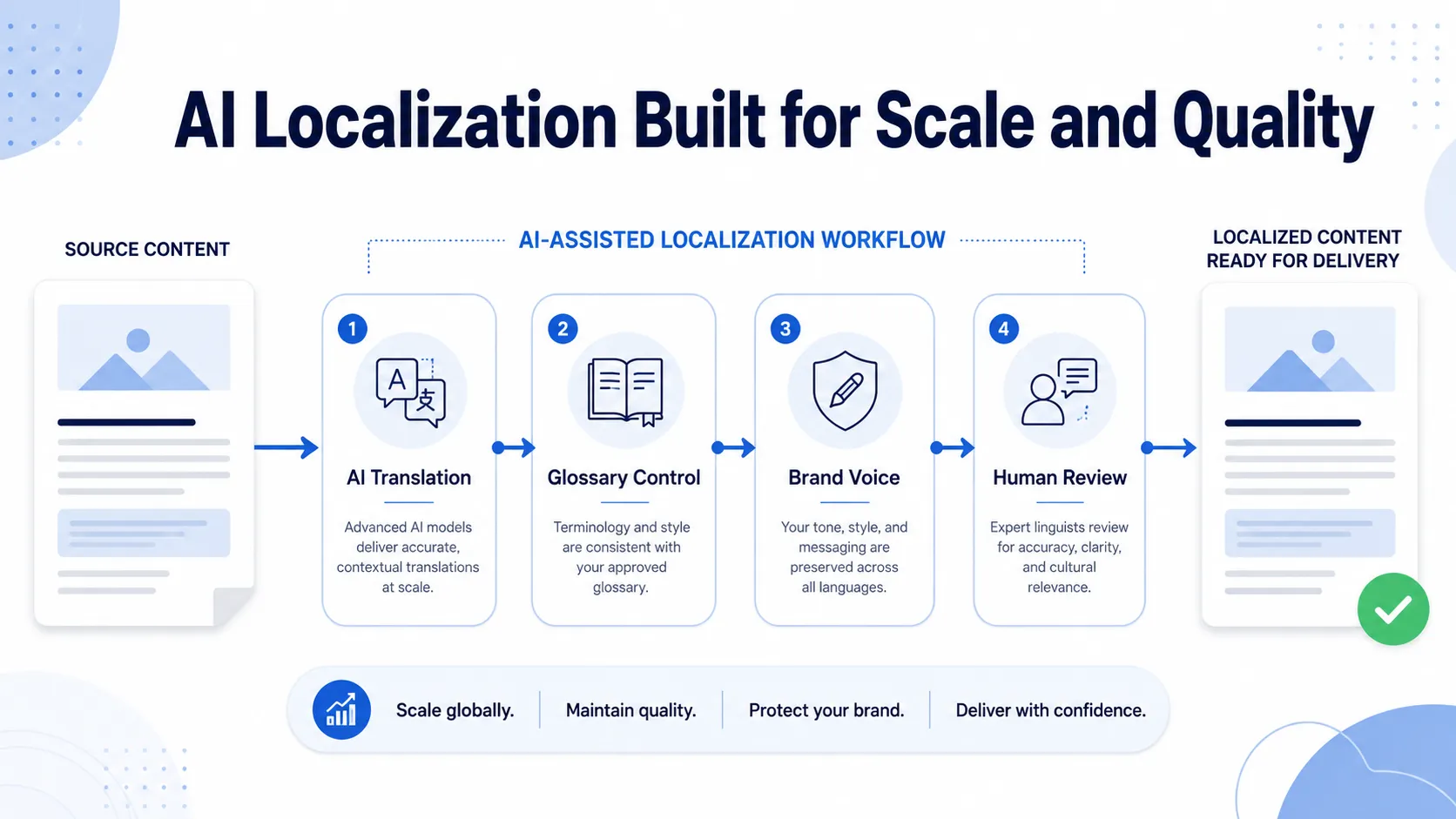
A solid software Localization structure should co-align with modern workflows and scale as newer languages are added on. Analysis of the local market, i18n, preparing source content, translation, localization, QA, and release cycles are taken into account. A solid structure helps you keep the momentum. Each iteration should reduce friction, improve efficiency, and enhance quality across all your supported languages and regions.
Internationalization Best Practices Before Localization Begins
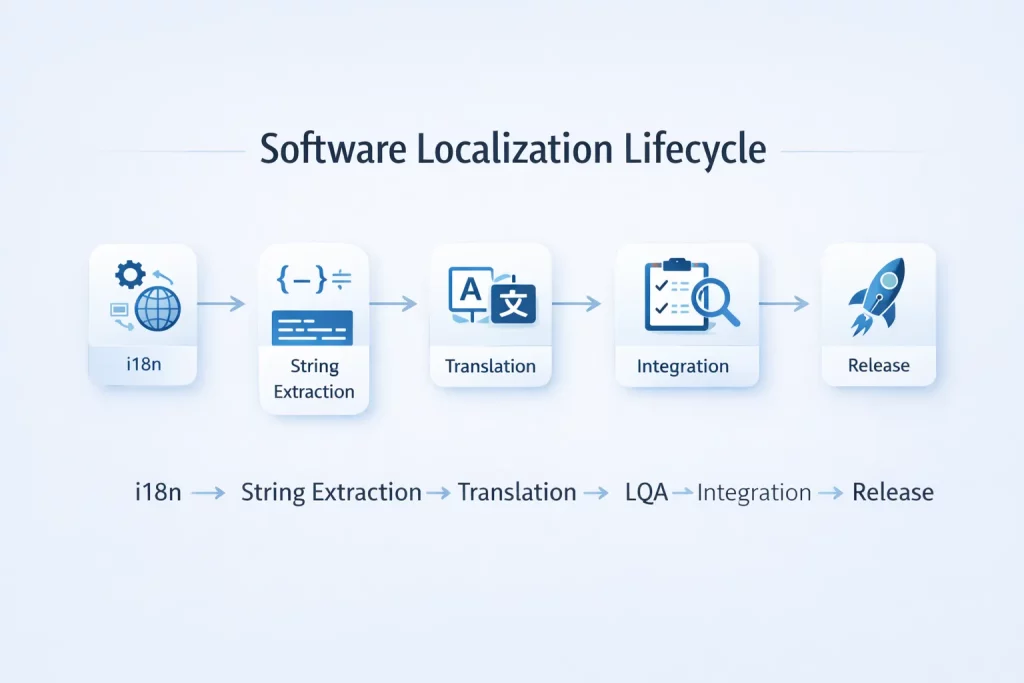
Internationalization best practices lay the technical foundation that makes localization possible, efficient, and maintainable at scale.
Proper i18n implementation is not optional for global software. If you want steady release cycles and zero friction with your current workflow, it is a non-negotiable.
Here are the core Internationalization Requirements:
- Externalize All Strings
- Avoid Hard-Coded Strings
- Implement Proper Unicode Support
- Design for Text Expansion
- Support RTL Language Layouts
- Handle Plural Rules Correctly
- Use Locale-Aware Formatting
- Prepare for Different Input Methods
Proper internationalization is an investment that pays throughout your product’s lifecycle. Applications built with strong i18n foundations add new languages faster, maintain consistency more easily, encounter fewer bugs in localized versions, and reduce overall localization costs.
How to Design an Effective Localization Workflow
An effective localization workflow orchestrates collaboration between product teams, engineering teams, and localization teams. The workflow must balance quality, speed, cost, and scalability while adapting to your organization’s specific development processes and release cadence.
A well-designed localization workflow becomes more efficient over time as translation memory accumulates, terminology standardizes, team members understand processes, and automation eliminates manual tasks.
So, what goes into a well-structured, efficient workflow that balances perfectly and scales?
Here are the core components of a scalable localization workflow:
- Source Content Management:
Establish a single source of truth for all localizable content in version control or a TMS. Teams should follow clear guidelines when adding or updating strings, including providing context for translators, flagging priorities, specifying review needs, and noting any character or formatting constraints.
- Change Detection and Notification:
Implement automated systems that detect when source content changes and notify the localization team. This typically integrates with your development workflow through git hooks, CI/CD pipeline triggers, TMS integrations that monitor resource files, automated extraction of new strings, and notifications sent to project managers and translators.
- Translation Management:
Use a translation management system to coordinate the translation work. A TMS provides centralized terminology management, translation memory for consistency and efficiency, context and screenshots for translators, quality assurance automation, version control for translated content, and collaboration tools for reviewers and linguists.
- Review and Approval Process:
Define review stages based on content type and risk. Typical workflows include initial translation, expert or senior review, linguistic QA for terminology and style, in-context UI review, and final approval by locale owners or native speakers.
- Integration and Validation:
Automate the integration of approved translations by importing resource files, validating string completeness, verifying variables and placeholders, running pseudo-localization tests, and notifying teams when content is ready for testing.
- Feedback Loop:
Establish feedback channels so developers, QA, and users can report localization issues to translators. Use this feedback to enable quick fixes, identify recurring errors, train linguists, and track quality improvements over time.
- Asynchronous Collaboration:
Global teams need asynchronous workflows with clear documentation, shared decision records, well-contextualized translation requests, automated notifications, and defined escalation paths for urgent issues.
Why Continuous Localization is Critical for Agile Teams
Continuous localization enables incremental translation that keeps pace with your development velocity, rather than translating software in large batches after development completes.
Traditional waterfall localization creates significant delays. Teams have to wait weeks for content to be publish-ready, creating a bottleneck disrupting schedules all around. For organizations shipping continuous updates, this process simply doesn’t work.
Continuous localization solves this problem by integrating translation into your CI/CD pipeline. This way, every update on the development side is sent directly for localization, and the localized content is directly queued for publishing.
Continuous Localization can benefit you with reduced time-to-market, cost, planning, and a better utilization of resources. Implementing continuous localization requires investment in automation and tooling, but the return on investment is substantial.
What Tools and Systems Support Modern Software Localization?
Your localization technology stack directly impacts the speed, cost, and quality of your global software releases. The right tools enable automation, enforce quality standards, facilitate collaboration, and scale efficiently as you add languages and markets.
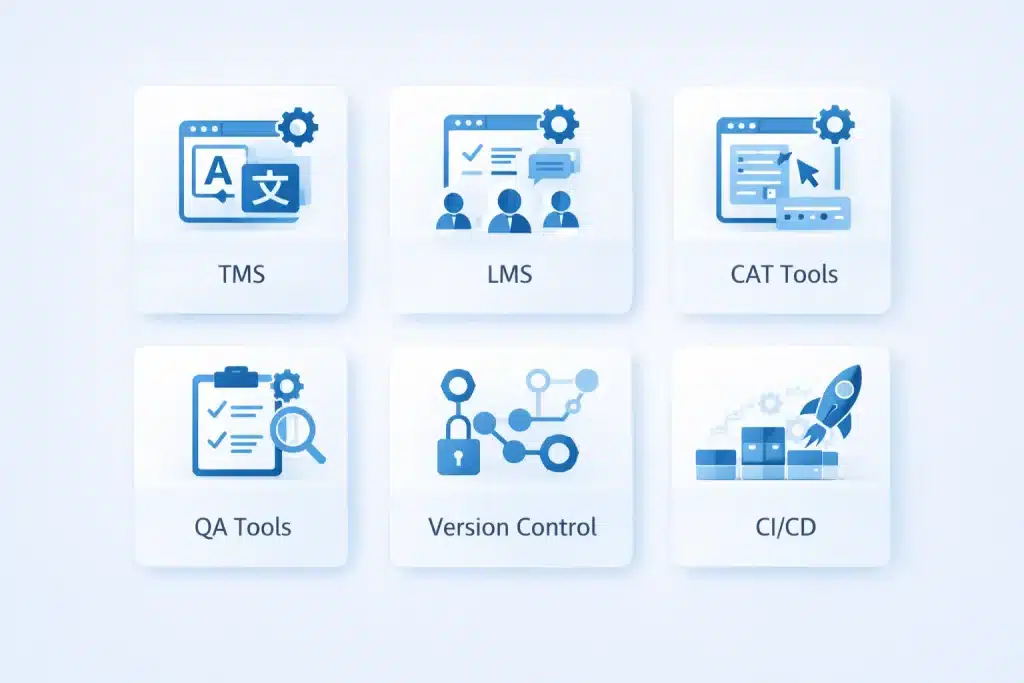
Modern software localization depends on integrated systems that connect your development tools, translation workflows, quality assurance processes, and deployment pipelines. While specific tool choices depend on your team and workflow, these are the baseline:
| Tool | Use Case |
| Translation Management Systems (TMS) | Coordinate translation work, manage linguistic assets, and integrate with development workflows |
| Localization Management Systems (LMS) | Extend TMS capabilities with project management, vendor management, budgeting, and reporting |
| Computer-Aided Translation (CAT) Tools | Provide translators with translation memory, terminology management, QA checks, and editing tools |
| Terminology Management Systems | Maintain approved terminology, definitions, and consistent translations across languages |
| Quality Assurance Tools | Automatically detect localization errors, inconsistencies, and formatting issues |
| Version Control Systems | Track and manage localization files, support collaboration, and enable rollbacks |
| CI/CD Tools | Automate the extraction, integration, and deployment of localized content |
Translation Management Systems (TMS) and Localization Platforms
A robust translation management system or localization management system is the cornerstone of efficient, scalable software localization. These platforms solve the fundamental coordination challenges that emerge with a global team, on content that changes frequently across dozens of languages.
Organizations attempting to coordinate localization through email and spreadsheets typically reach their breaking point at the 5th language. Teams lose time managing the chaos instead of focusing on actual tasks at hand.
Professional TMS and LMS platforms solve these problems through centralized workflows.
Essential TMS/LMS Capabilities include centralized string management, translation memory, terminology management integration, automated QA, API integration, and other collaborative features that help teams with easy handover. With a one-platform solution, it cuts human intervention, which is then delegated to actual localization efforts.
Handling UI String Localization and Resource Files
UI string localization requires careful attention to technical details that directly impact both translation quality and engineering efficiency.
Resource files, on the other hand, are the bridge between your code and your translators. Different technology stacks use different resource file formats. For example:
- JSON for web applications
- XML for Android, string files for iOS
- YAML for Ruby and Python applications, properties files for Java
- RESX for .NET applications
Regardless of format, certain best practices ensure smooth localization workflows and quality results. Descriptive string keys help translators understand context even before reading the string value, including comments for added context in resource files, standardized placeholder formats, and design with expansion in mind, and version consistency is key when handling UI localization and resource files.
Well-structured resource files reduce translation costs, improve translation quality, accelerate integration cycles, minimize bugs in localized versions, and make your localization workflow more efficient as you scale.
How Do You Manage Linguistic QA and Localization Testing?
Linguistic quality assurance and localization testing are distinct disciplines from standard software testing, requiring specialized expertise, processes, and tools.
Linguistic QA ensures your translations communicate clearly, consistently, and appropriately for target markets.
Underinvesting in localization results in confusion, cultural inappropriation, and undermines trust. Translation errors that make your company appear unprofessional. UI breaks caused by text expansion, and locale-specific functional issues directly impact user adoption, support costs, and brand perception in international markets.
What is Linguistic QA in Software Localization?
Linguistic QA (LQA) is the systematic evaluation of translation quality against defined criteria for accuracy, consistency, style, and appropriateness. It requires human judgment from qualified native speakers who understand both the source and target languages.
LQA judges your apps’ linguistic accuracy, consistency, terminology, style, cultural appropriateness, and UI fit. This ensures accuracy, consistency, and compliance.
Effective linguistic QA starts with clear, measurable quality standards tailored to your product and content risk. Reviews should be performed by qualified native subject matter experts. Issues must be documented with actionable, detailed feedback so translators can fix them efficiently, while systematic tracking of findings helps identify recurring problems, terminology gaps, training needs, and long-term quality trends across languages and releases.
Functional and Localization Testing Across Locales
Localization testing validates that your software functions correctly in each target locale. It combines functional testing with locale-specific validation, ensuring users in each market encounter a fully working, properly adapted product.
Functional issues sometimes only manifest in specific locales. Date formats, compliance, and currencies are a few of the most common issues. These problems don’t appear in your source language environment and require systematic testing with locale-specific configurations, data, and devices.
Core Localization Testing Focus Areas include locale-specific formatting, text and UI rendering, and RTL language support.
Pseudo-localization artificially modifies the source text to simulate translation issues without actual translation. It’s valuable for early detection of internationalization problems by expanding text to expose UI constraints, Unicode support, RTL directionality, and concatenation issues.
Effective localization testing requires test plans that cover locale-specific scenarios, test data representing each target locale, testing on devices and configurations used in target markets, testers fluent in target languages, and systematic tracking of locale-specific issues.
Cultural Adaptation in Software UX and Content
Cultural adaptation in software extends beyond language translation to encompass the visual, functional, and experiential dimensions that determine whether your product feels native to users in each market.
Even with perfect translation, software that ignores cultural context will struggle to achieve adoption in foreign markets. Users instinctively recognize when products have been genuinely adapted for their market versus merely translated, and this perception directly impacts trust, engagement, and willingness to adopt.
Cultural differences in user expectations, preferences, and behaviors manifest throughout the user experience. Color and symbol associations vary significantly across cultures. Formality levels and even visual density preferences also differ from culture region to region.
Cultural adaptation improves usability by aligning with user mental models and expectations. This builds trust by demonstrating respect for local norms and preferences, increases conversion by removing cultural friction from key flows, reduces support costs through culturally appropriate help content, and enhances brand perception by positioning your company as a serious player in the market.
When Does Cultural Adaptation Matter Most?
While cultural sensitivity should inform all localization decisions, certain areas of your application benefit particularly from deliberate cultural adaptation. Prioritizing these high-impact areas ensures the best return on your cultural localization investment.
Areas like the first-run experience, error message and system notifications, payment, customer service, compliance, and marketing features must be culturally adapted. These are client-facing interactive elements, and proper adaptation builds confidence in the software and retains its user base.
Common Software Localization Mistakes and How to Avoid Them
Even experienced teams make predictable mistakes that delay releases, increase costs, and compromise quality in localized products. Understanding these common pitfalls enables proactive prevention rather than expensive reactive fixes. The patterns repeat across companies and industries. By learning from others’ mistakes, you can implement processes and practices that avoid these costly errors in your localization program.
Here are a few common pitfalls teams often fall for:
- Starting Localization Too Late in Development
- Ignoring Internationalization Best Practices
- Insufficient Context for Translators
- No Linguistic Quality
- Manual, Email-Based Localization Workflows
- No Localization Ownership or Accountability
- Inconsistent Terminology Management
Why Hard-Coded Strings and Tight UI Break Localization
Hard-coded strings are user-facing text embedded directly in code rather than stored in external resource files. They seem convenient during rapid development, but quickly become expensive technical debt the moment you pursue localization.
Every hard-coded string represents a localization failure point that must be discovered by manually reviewing, fixing, and testing the code.
Hard-coded strings and inflexible UI layouts are the technical debt that kills localization programs. These interconnected problems create issues that cascade throughout your localization workflow, and both stem from development practices that prioritize short-term expediency over long-term maintainability.
Tight UI layouts that don’t accommodate text expansion break in dramatic, visible ways when localized. Fixed-width buttons, hardcoded pixel layouts, and inflexible containers that work perfectly in English overflow, truncate, or break entirely with translated text as they expand. These problems multiply across your application, requiring either an expensive redesign or accepting an inferior user experience in international markets.
Modern UI frameworks make flexible layouts straightforward. Use flexbox and grid layouts that adapt to content size within a range. Teams then test with pseudo-localization and review UI specs early on in the DevOps.
How Software Localization Supports Global Product Growth
Well-executed software localization best practices directly drive measurable ROI and enable sustainable global expansion.
Localization increases your addressable market, improves conversion and retention in international markets, and builds competitive advantages that are difficult for rivals to replicate.
A strong software localization directly affects time-to-market, global adoption, and customer churn. It enables simultaneous global releases, improves retention, and reduces support costs through optimized UI/UX. Well-localized products rank better in local search and app stores, earn stronger reviews from native users, and stand out as premium solutions in competitive global markets.
Localization Readiness Checklist for Global Releases
Before launching in new markets, a systematic evaluation of your localization readiness prevents costly post-launch issues.
Use this checklist to assess readiness and identify gaps requiring attention:
- Internationalization-Ready Codebase
- Version Control and Automation
- Stable, Well-Prepared Source Content
- Terminology and Linguistic Assets
- Qualified Linguistic Resources
- Defined Translation and Review Workflows
- Linguistic QA and Localization Testing
- Locale-Accurate Test Environments
- Market, Cultural, and Compliance Readiness
- Organizational Ownership and Scalability
This comprehensive readiness assessment helps you identify and address gaps before they become pre or post-launch problems that damage your reputation and slow adoption in new markets.
Why Work with a Professional Software Localization Partner?
Partnering with professional localization services providers offers superior results, faster time-to-market, and better resource efficiency, especially during the critical phases of international expansion or when scaling to many languages.
At Circle Translations, we understand that software localization best practices are about enabling your software to match, if not surpass, the local competition.
Our specialized approach combines native linguistic excellence, technical localization engineering, and proven processes refined across diverse industries. Whether you’re launching your first international market or scaling to dozens of languages, our team delivers the quality, speed, and reliability your global software demands.
With circle translations, you can expect:
- Native Linguistic Expertise at Scale:
Circle Translations works with vetted native-speaking linguists across multiple markets, combining software domain expertise, terminology accuracy, and cultural fluency without the overhead of building in-house teams.
- Localization Engineering Built for Software:
We go beyond translation by applying deep localization engineering expertise, including internationalization best practices, UI adaptation, resource file handling, and seamless integration with development workflows.
- Proven Linguistic QA Frameworks:
Circle Translations applies structured, multi-layer QA processes that combine native review, automated checks, in-context validation, and root-cause analysis to prevent issues before release.
- Enterprise-Grade Security and Confidentiality:
We protect sensitive software content through strict NDAs, secure systems, controlled access, and compliance-ready security practices suited for enterprise and regulated environments.
- Scalable Delivery Without Quality Tradeoffs:
As your product grows across languages, markets, and release cycles, Circle Translations scales resources, automation, and processes to maintain speed, consistency, and quality.
Conclusion
If you’re building software for global users, localization directly affects how fast you can scale, how confidently you can release, and how well your product performs in new markets. Strong internationalization, structured workflows, continuous localization, and rigorous QA aren’t just best practices; they prevent delays, reduce long-term costs, and protect user trust as your product grows.
Teams that approach localization as an integrated part of product development, as opposed to a post-release task, ship more consistently, support more markets with less friction, and deliver experiences that feel truly native rather than merely translated. Whether you’re expanding into your first new region or managing dozens of locales, investing in localization maturity pays off in adoption, retention, and operational efficiency.
For organizations looking to strengthen this foundation, working with experienced localization specialists can help translate best practices into execution. Circle Translations supports SaaS companies, enterprise platforms, and mobile apps with native linguistic expertise, localization engineering, and scalable processes, helping teams move faster globally while maintaining quality and control.
Ready to scale your software globally with localization excellence? Circle Translations delivers the native linguistic expertise, technical localization engineering, and proven processes that enable successful international expansion. Our specialized software localization services help SaaS companies, enterprise platforms, and mobile applications achieve professional localization quality at competitive prices. Talk to a software localization expert or request a localization readiness review to discover how we can accelerate your global growth.
Software Localization Best Practices – FAQs
What is the software localization process?
Software localization includes internationalization, string extraction, translation via a TMS, linguistic QA, functional testing, and final in-product validation. Mature teams integrate these steps into continuous workflows that align with agile development cycles.
How is localization different from internationalization?
Internationalization (i18n) prepares software for multiple languages through engineering work like externalizing strings, Unicode support, flexible UI layouts, and locale-aware formatting. Localization (L10n) then adapts the product for each market by translating content, adjusting cultural elements, and testing per locale. You internationalize once to enable localization many times.
What is continuous localization?
Continuous localization embeds translation into agile development so localization progresses alongside code releases. New or updated strings are automatically extracted, translated, and reintegrated as developers commit changes, often within days. This removes post-development bottlenecks and enables simultaneous global launches.
Why is localization testing important?
Localization testing validates the full user experience across locales. This ensures translated text fits the UI, formats (dates, numbers, input) follow local rules, functionality works with locale-specific data, and RTL layouts display correctly. Many issues only surface in real locale environments, making this testing essential for quality.
What tools are used for software localization?
Teams use TMS and localization platforms, QA tools, and CI/CD integrations to manage multilingual releases efficiently. A modern stack coordinates translation, enforces terminology, automates QA, manages versioned resources, and deploys localized content, dramatically improving efficiency, quality, and scalability.
What are common software localization mistakes?
Common localization issues include hard-coded strings, late planning, missing linguistic QA, and manual workflows. These lead to costly refactors, delayed releases, poor translation quality, and poor scalability. With proper planning, clear ownership, and the right processes and tools, these problems are predictable and avoidable.