The tools of translation are the software systems, professional translators, and translation companies use to produce accurate, consistent, and efficient translated content.
The main categories are: CAT tools, translation memory (TM), termbases, machine translation (MT) engines, translation management systems (TMS), and quality assurance (QA) tools. Together, these form the quality system that separates professional translation from unassisted typing.
Enterprise buyers evaluate translation vendors on outcomes, accuracy, consistency, cost, and scalability. Those outcomes are determined by the toolchain: CAT tools with TM and terminology deliver repeatable quality; plain editors and free MT tools do not.
This guide explains each tool category, how they work, where they fail, and how they support MTPE and professional translation workflows.
What Are the Tools of Translation? Six Categories and Their Functions in a Professional Workflow
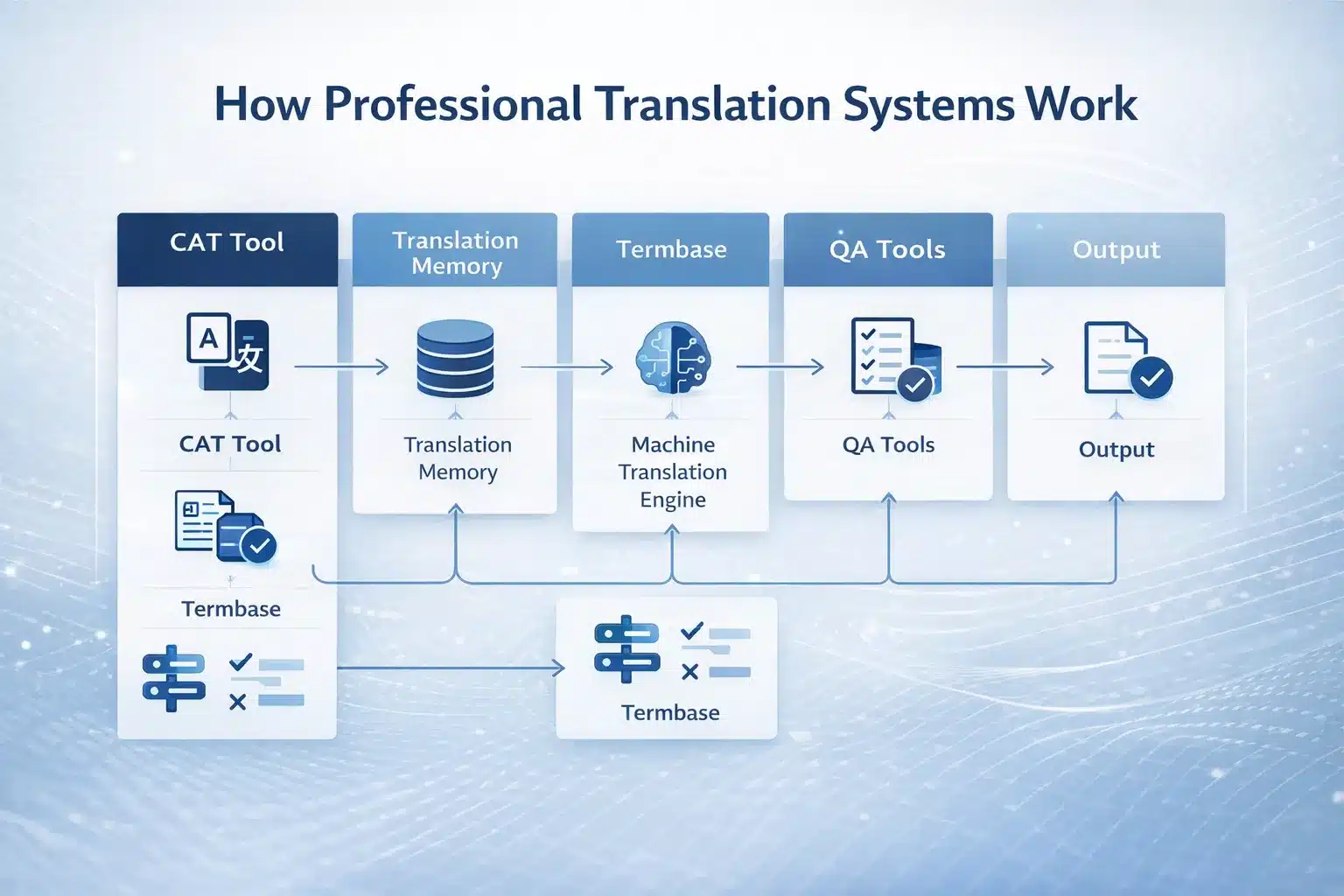
The tools of translation are a layered system of specialised software, each performing a distinct function in producing accurate, consistent, and scalable translations.
These tools work together as a controlled production system. Evaluating each category reveals how a translation provider manages quality, cost, and risk.
As Dorothy Kenny (2022) explains in Machine Translation for Everyone, “Translation today is supported by a range of tools and technologies that assist human translators in producing consistent and efficient output,” highlighting that modern translation relies on integrated systems rather than isolated tools.
| Category | Primary function | Key tools | B2B quality impact |
| CAT tool (computer-assisted translation) | Translator’s working environment: segmentation, TM lookup, terminology enforcement | SDL Trados Studio, memoQ, Phrase TMS, Smartcat, Wordfast, OmegaT, Déjà Vu | Consistency, speed, format preservation |
| Translation memory (TM) | Database of approved source–target segments reused across projects | TM stored in CAT tools/TMS (TMX format) | 30–55% cost reduction; cross-project consistency |
| Terminology database (termbase / TB) | Approved vocabulary for brand, product, and domain terms | SDL MultiTerm, memoQ TB, Phrase TB (TBX format) | Brand control; legal and compliance accuracy |
| Machine translation (MT) engine | Automated first-draft translation | DeepL API, Google Cloud Translation API, Microsoft Azure Translator | High speed; requires MTPE for quality |
| Translation management system (TMS) | Workflow, project routing, TM/TB centralisation, reporting | Phrase TMS, Smartling, Lokalise, Smartcat, XTM, Crowdin | Scalability, audit trail, process control |
| Quality assurance (QA) tools | Automated checks for consistency, terminology, and formatting | Xbench, Verifika, Phrase QA, CAT QA modules, MQM | Error detection; delivery standardisation |
Translation Tools Are a Type of Productivity and Quality System — Not Just Software
Translation tools function as a productivity and quality system that supports human translators, not as automated translators. They surface TM matches, enforce terminology, segment content for parallel workflows, preserve file formats, integrate MT for MTPE, and continuously build reusable assets.
They do not guarantee accuracy, replace human judgment, or handle all file types. Meaning, tone, and domain correctness remain human responsibilities. Poor translators still produce poor output—even with advanced tools.
Which of the Following Translation Tools Does Not Use Translation Memory? Key Distinctions Between Tool Types
Free MT tools, basic MT APIs, and plain text editors do not use translation memory; CAT tools and TMS platforms always rely on TM.
Tools using TM:
- CAT tools (Trados, memoQ, Phrase TMS, Smartcat, Wordfast, OmegaT)
- TMS platforms (Smartling, Lokalise, XTM, Crowdin)
Tools not using TM:
- Browser MT tools (Google Translate, DeepL web, Microsoft Translator)
- MT APIs without integration (Google API v2, Azure basic endpoints)
- Word, Excel, and plain editors
B2B implication: “We use translation memory” only has value if translators work inside a CAT or TMS environment. Request TMX exports to confirm ownership and reuse.
Which of the Following Tools Translates Source Code? Translation Tools by Content and File Type
Localisation tools and CAT tools with proper format support translate source code safely; free MT tools corrupt code structure.
Tools that handle developer formats:
- XLIFF (standard for software strings; supported by CAT and TMS tools)
- JSON, YAML, PO, .strings (handled by Lokalise, Phrase Strings, Crowdin, Transifex)
- GitHub/GitLab integrations for continuous localisation
- Pseudolocalisation for UI testing before translation
Tools that do not:
- Standard CAT setups without configuration (Trados, memoQ default)
- Free MT tools (DeepL web, Google Translate)
Business impact: Using the wrong tool on source code introduces syntax errors, breaks applications, and creates production risk. Use localisation platforms combined with MTPE and human review for safe deployment.
CAT Tools (Computer-Assisted Translation): How They Work, What They Contain, and Why They Matter for Quality
CAT tools are the translator’s primary working environment where translation memory, terminology, MT integration, QA, and file handling operate as a unified quality system.
They explain why professional translation achieves 99%+ consistency and accuracy, while unassisted workflows and free tools do not.
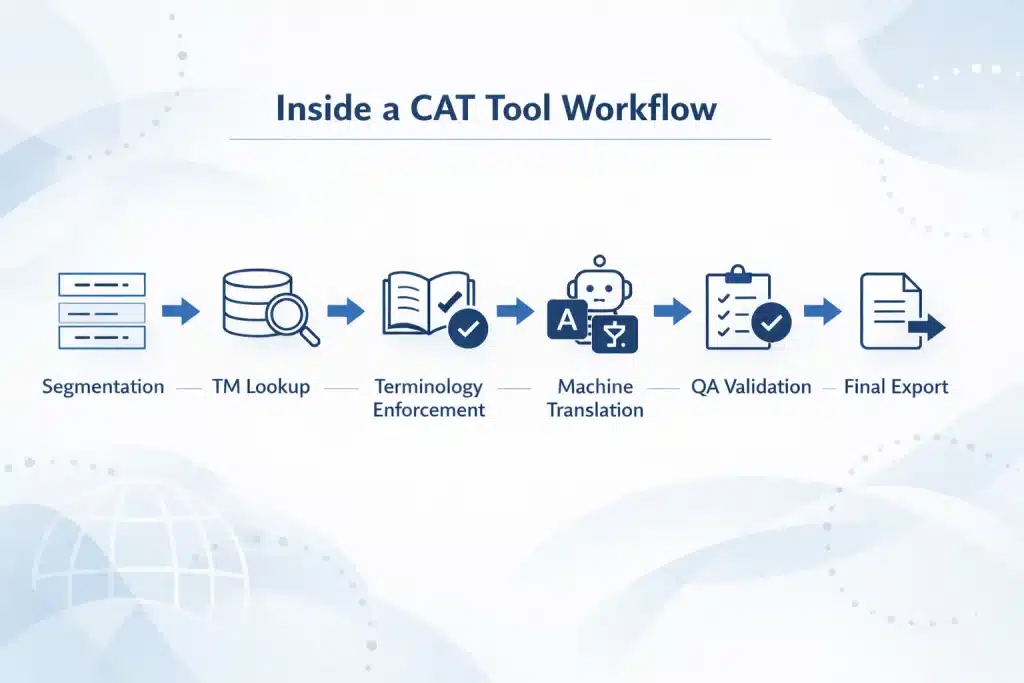
How a CAT Tool Works: Segmentation, TM Lookup, Terminology Checking, and Segment Approval
A CAT tool structures translation into a series of controlled steps that combine automation with human decision-making.
The workflow follows 6 steps:
- Step 1 — Segmentation: the source file (DOCX, PPTX, XLIFF, HTML, PDF) is split into sentence-level segments
- Step 2 — TM lookup: exact matches (100%), fuzzy matches (75–99%), or no matches are retrieved
- Step 3 — Terminology enforcement: approved terms are suggested; incorrect terms are flagged
- Step 4 — MT suggestion: DeepL, Google, or Azure output appears for segments without TM
- Step 5 — QA validation: checks for numbers, tags, terminology, and completeness
- Step 6 — Export: translated file is rebuilt in original format
Business impact: 20–40% faster delivery, consistent reuse of approved translations, and reduced error rates across large document sets.
Major CAT Tools Compared: SDL Trados Studio, memoQ, Phrase TMS, Smartcat, OmegaT, and Wordfast
Professional CAT tools differ by deployment model, scalability, and enterprise control, but all include TM, termbase, and MT integration.
| Tool | Type | Best for | TM | Termbase | MT integration | File formats | Pricing model |
| SDL Trados Studio | Desktop | Legal, medical, enterprise | ✓ | ✓ (MultiTerm) | ✓ multi-engine | Widest (incl. InDesign, SDLXLIFF) | ~$695/year |
| memoQ | Desktop + Server | Enterprise/LSP operations | ✓ | ✓ | ✓ multi-engine | Wide | ~$550–700/year |
| Phrase TMS | Cloud | SaaS, agile teams | ✓ | ✓ | ✓ multi-engine | JSON, XLIFF, DOCX, HTML | $49+/month |
| Smartcat | Cloud | Agencies, collaboration | ✓ | ✓ | ✓ (DeepL, Google) | Wide | Freemium |
| Wordfast | Desktop + Cloud | Freelancers | ✓ | ✓ | ✓ | Standard formats | ~$300/year |
| OmegaT | Open-source | Budget users | ✓ | ✓ (basic) | ✓ (plugins) | Standard + plugins | Free |
| Déjà Vu | Desktop | Legacy enterprise | ✓ | ✓ | ✓ | Wide | ~$500/year |
B2B implications:
- SDL Trados Studio is the industry standard used by most professional translators
- memoQ is the primary enterprise alternative with strong server capabilities
- Phrase TMS supports API-driven, cloud-first localisation workflows
- Smartcat and OmegaT reduce cost but limit enterprise-level control
XLIFF, TMX, and TBX: The File Formats That Make Translation Tools Interoperable
TMX, XLIFF, and TBX are standard formats that ensure translation assets are portable, reusable, and owned by the client.
| Format | Function | What it contains | B2B implication |
| TMX | Translation memory exchange | Source–target segment pairs | Cost savings asset portability |
| XLIFF | Content exchange | Translatable text + structure | Tool interoperability |
| TBX | Terminology exchange | Approved terms, usage rules | Brand and compliance consistency |
Key rule for buyers:
- Request TMX export (translation memory)
- Request TBX export (termbase)
These files represent your accumulated translation investment and prevent vendor lock-in.
In-Context Editing and Visual Review Tools: How Modern Localisation Tools Support Translation of Marketing and UI Content
In-context editing tools improve translation accuracy by showing content inside its real visual environment.
They address three critical issues:
- UI expansion: translations can be 20–40% longer than source text
- Context ambiguity: words change meaning depending on interface location
- Layout risk: text overflow breaks UI and design
Tools supporting in-context translation:
- Phrase Strings
- Lokalise
- Smartling
- Crowdin
- Transifex
- WordPress (WPML, Polylang)
Marketing and UI benefits:
- Validates tone and brand voice in real layout
- Detects truncation and overflow before release
- Enables translators to flag design issues directly
Real-time translation for chatbots:
- DeepL API, Microsoft Translator API (<200ms latency)
- Smartling Real-Time, Lokalise Live
Limitation: These tools improve context but do not guarantee accuracy. Human review and MTPE remain required for brand, legal, and compliance-sensitive content.
B2B takeaway: CAT tools are the minimum infrastructure for professional translation. Without them, organisations lose consistency, increase costs, and introduce measurable legal and brand risk.
Translation Memory: How TM Works, Match Types, ROI, and Why It Is a B2B Asset
Translation memory reduces translation costs by 30–55%, enforces consistency across all content, and compounds in value as more content is translated.
It is the highest-impact tool for any organisation translating recurring content at scale.
How Translation Memory Works: Segments, Match Rates, and the TM Database Structure
Translation memory stores approved sentence-level translations and retrieves them as exact or partial matches in future projects.
Each TM entry contains:
- Source segment and target translation
- Language metadata
- Project/domain tags
- Translator and date metadata
- Client-specific ownership
TM builds automatically during translation. Every approved segment is stored without manual input.
When reused, TM returns:
- 100% match → identical reuse
- 95–99% → minor edits (numbers, names)
- 75–94% → partial reuse
- <75% → new translation
Performance benchmarks:
- 0% match rate at project start
- 20–40% after 12–18 months
- 50–70% for mature technical or regulatory content
Higher match rates directly reduce cost and increase consistency.
Translation Memory ROI: How TM Discounts Work and the Long-Term Cost Reduction Model
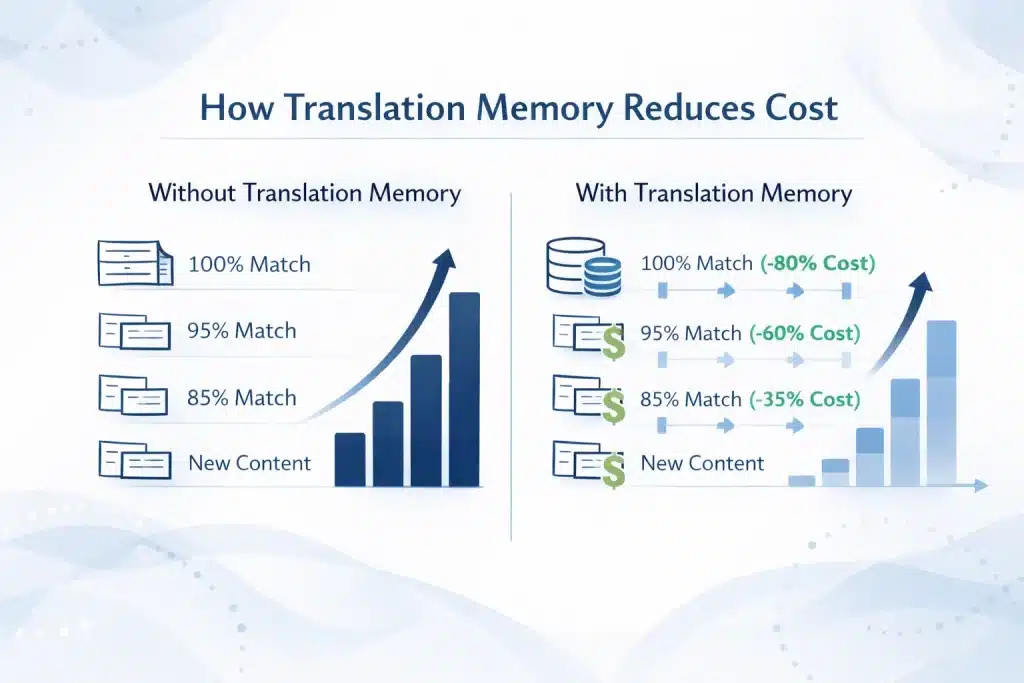
Translation memory generates measurable ROI through discounted billing on reused content.
| Match type | Typical billing rate (% of full rate) |
| 100% match | 0–20% |
| 95–99% | 20–40% |
| 85–94% | 50–65% |
| 75–84% | 65–80% |
| No match | 100% |
Worked example (100,000 words/year at $0.18/word):
| Category | Cost |
| Without TM | $18,000 |
| With TM | $10,710 |
| Annual saving | $7,290 (40.5%) |
Compounding effect:
- 35% match rate → ~40% savings
- 50% match rate → 55%+ savings
Quality impact: TM ensures identical sentences remain identical across documents, eliminating variation in legal clauses, product descriptions, and compliance language.
Tools for Managing Translations of Compliance Guides, Company Policies, and Regulatory Documents
TMS platforms with strong TM and termbase integration deliver 60–80% match rates for compliance and policy content.
Compliance content benefits most because it is:
- Structurally repetitive
- Regularly updated
- Legally binding
Workflow:
- Initial translation builds TM and termbase
- Annual updates reuse unchanged segments (100% matches)
- Terminology enforcement ensures legal consistency
- Cross-document TM ensures identical clauses across policies
Tools used:
- Phrase TMS → version control and TM centralisation
- memoQ → multi-document project handling
- XTM → audit trails for compliance workflows
- SDL Trados + GroupShare → enterprise TM control
B2B implication:
TM transforms compliance translation from full-cost retranslation into a controlled update process with predictable cost, auditability, and legal consistency.
Transition:
Translation memory reduces cost and enforces reuse, but it does not control vocabulary. That role belongs to termbases, which define exactly how key terms must be translated across all content.
Terminology Management: Termbases, Glossaries, and How Consistent Vocabulary Protects B2B Brand and Legal Accuracy
Terminology management ensures consistent use of approved vocabulary across all translations, directly protecting brand integrity, legal accuracy, and technical precision.
It is the most underutilised control layer in translation workflows and the primary driver of consistency at scale.
What Is a Termbase and How It Differs from a Translation Glossary
A termbase is a structured terminology database with rules and validation logic, while a glossary is a simple list of translations without enforcement.
| Feature | Glossary | Termbase |
| Structure | Flat list (CSV/XLSX) | Multi-field database |
| Usage rules | None | Preferred / acceptable / forbidden |
| Context | No | Yes (examples, definitions) |
| Domain control | No | Yes (legal, technical, marketing) |
| QA enforcement | No | Yes (real-time validation) |
A glossary provides reference only. A termbase enforces correctness during translation.
B2B implication:
- Brand names remain unchanged
- Legal terms remain consistent across jurisdictions
- Technical terminology is applied correctly in every document
Tools: SDL MultiTerm, memoQ term base, Phrase term base, IATE, Microsoft Terminology Collection.
Building a Termbase: How to Create, Populate, and Maintain Your Organisation’s Terminology Database
A structured 5-step process builds a termbase that scales across all translation projects and reduces terminology errors to near zero.
- Extract terms: identify candidate terms using CAT tools (MultiTerm Extract, memoQ) and manual SME review
- Define usage rules: assign preferred, acceptable, and forbidden terms
- Approve translations: validate with domain experts (legal, medical, technical)
- Import into tools: upload via TBX into CAT tools or TMS for real-time enforcement
- Maintain continuously: update annually for product, regulatory, and brand changes
Key control mechanism:
Forbidden terms trigger immediate QA flags, preventing incorrect terminology before delivery.
Business impact: Reduced legal risk, stronger brand consistency, and fewer revision cycles.
How a Parallel Corpus Extends Terminology and Translation Memory
A parallel corpus improves translation memory, termbases, and machine translation by providing a validated dataset of source–target text pairs.
| Use case | Impact | Measurable result |
| TM seeding | Immediate reuse | 20–50% match rate from project start |
| Term extraction | Faster termbase creation | Higher terminology consistency |
| MT training | Domain-adapted output | Improved MT accuracy |
A curated corpus contains only approved translations, organised by domain (legal, technical, marketing).
B2B implication:
- Faster onboarding of new translation programmes
- Reduced first-project costs
- Higher MT quality in MTPE workflows
Transition:
Termbases enforce vocabulary and TM enforces reuse, but neither guarantees final quality. That role is handled by QA tools and LQA frameworks, which detect errors and quantify translation quality before delivery.
Translation Quality Assurance Tools: Automated QA Checkers, LQA Frameworks, and MQM Scoring
Quality assurance tools detect errors automatically and quantify translation quality, ensuring consistency, compliance, and measurable performance across all deliverables.
They form the final control layer before delivery and determine whether output meets enterprise quality thresholds.
Automated QA Checkers: What They Detect and What They Cannot Replace
Automated QA tools scan translations for structural, numerical, and terminology errors that humans often miss at scale.
They detect:
- Number consistency: mismatches in dates, currencies, percentages
- Tag integrity: missing or broken formatting tags
- Terminology compliance: incorrect or forbidden terms
- Untranslated segments: source text left unchanged
- Length anomalies: segments <25% or >400% of source length
- Spelling and basic grammar errors
- Repetition inconsistencies across identical segments
Common tools:
- Xbench (industry standard)
- Verifika (advanced QA + terminology)
- Phrase QA module
- Trados QA checker
- Okapi Framework
Limitations:
- Cannot evaluate meaning accuracy
- Cannot assess cultural appropriateness
- Cannot enforce brand voice
- Cannot validate domain-specific correctness
B2B implication: QA tools reduce mechanical errors to near zero but require human review for meaning and context.
Linguistic Quality Assurance (LQA) and MQM Scoring: The Human Quality Framework
LQA evaluates translation quality using human review, while MQM provides a standardised scoring model for enterprise-level measurement.
| MQM dimension | Example errors |
| Accuracy | Mistranslation, omission |
| Fluency | Grammar, punctuation |
| Terminology | Incorrect or inconsistent terms |
| Style | Tone and register issues |
| Locale | Date, currency formatting |
| Markup | Tag and structure errors |
Errors are classified by severity:
- Critical → impacts legal validity or meaning
- Major → affects comprehension
- Minor → cosmetic issues
MQM formula:
Score = (critical × 25 + major × 5 + minor × 1) ÷ words × 1,000
Benchmarks:
- Acceptable quality: <5 errors per 1,000 words
- Enterprise standard: <2 errors per 1,000 words
B2B applications:
- Vendor comparison during procurement
- Ongoing quality monitoring (sample 10–20%)
- SLA enforcement with measurable thresholds
Back-Translation and In-Country Review: Human Quality Tools for Regulated and High-Stakes Content
Back-translation and in-country review provide additional validation for legal, medical, and high-risk content where errors carry regulatory or financial consequences.
| Method | Purpose | Use case | Limitation |
| Back-translation | Verifies meaning accuracy | Pharma, legal filings | Adds cost and time |
| In-country review (ICR) | Ensures local correctness | Marketing, legal | Requires SME availability |
Back-translation compares translated content against the original via reverse translation.
In-country review ensures terminology, tone, and compliance match local standards.
B2B implication:
- Required for regulated industries (FDA, MDR, legal systems)
- Reduces risk of compliance failure and market rejection
- Should be applied selectively due to cost impact
Transition:
QA tools and LQA frameworks ensure measurable quality, but they rely on the underlying system—CAT tools, TM, and termbases. When combined with MTPE and human review, they produce enterprise-grade translation outcomes.
Circle Translations — The Complete Translation Quality System, Applied to Your Content
Professional translation quality depends on a fully integrated system of tools, workflows, and human expertise—not on tools alone.
The tools of translation, CAT tools, translation memory, termbase, QA checkers, and MQM scoring, only deliver results when applied within a controlled, enterprise-grade process.
At Circle Translations, every project includes:
- Professional CAT tools (SDL Trados, memoQ, Phrase TMS) across all languages
- Client-owned translation memory (TMX export guaranteed)
- Termbase enforcement for brand, product, and regulatory terminology
- Automated QA checks (Xbench, Verifika) for numbers, tags, and consistency
- Two-stage human review (translator + reviser) with optional MQM scoring
- Secure workflows (NDA + encrypted file transfer)
- Parallel corpus development for TM and MT optimisation
- MTPE workflows using DeepL, Google, and Microsoft engines
Tell us your content type, language pair, and volume — receive a defined workflow, toolchain, and cost model.
Want TM, Termbase & QA Working Together on Your Content?
Circle Translations runs every project through CAT tools, client-owned translation memory, termbase enforcement, and two-stage human QA — so consistency and accuracy are built into the process, not left to chance.
Frequently Asked Questions — Tools of Translation
What are the tools of translation used in professional practice?
The tools of translation are CAT tools, translation memory, termbases, machine translation engines, TMS platforms, QA tools, and MQM frameworks used to produce accurate and consistent translations.
What is a CAT tool, and is it the same as machine translation?
A CAT tool is a translation environment that supports human translators, while machine translation is an automated output generated by AI without human input.
What is translation memory, and does it reduce my translation costs?
Translation memory is a database of previously translated sentences that reduces costs by 30–55% throughthe reuse of identical or similar content.
What is a termbase, and how does it improve translation consistency?
A termbase is a structured database of approved terminology that enforces consistent use of brand, legal, and technical terms across all translations.
What is the difference between a CAT tool and a TMS?
A CAT tool is used to perform translation, while a TMS manages workflows, teams, translation memory, and project delivery at scale.
Which translation tools are used for software and app localisation?
Software localisation tools such as Lokalise, Phrase, Crowdin, and Transifex handle JSON, XLIFF, and other developer file formats with Git integration.
What is MQM, and how is translation quality measured?
MQM is a standard framework that measures translation quality using weighted error scoring per 1,000 words, with enterprise targets below 2 errors.
How do localization tools support the translation of marketing materials?
Localization tools support marketing translation through in-context editing, terminology enforcement, and automated workflows that preserve brand consistency.
What is a parallel corpus and why does it matter for translation tool performance?
A parallel corpus is a dataset of approved source-target translations that improves translation memory, terminology extraction, and machine translation accuracy.